
Fleet Management

A commercial vehicle dash cam is a camera system mounted in trucks, vans, or other fleet vehicles to record driving events, monitor driver behavior, protect against false claims, and support overall fleet safety management. Fleets searching for the best dash cam for commercial vehicles typically want to compare features, pricing, camera configurations, and how these systems fit into a broader safety program.
Commercial truck camera systems have become standard equipment in many fleet operations. They range from simple single-lens units to advanced AI-powered platforms with driver-facing and road-facing views. The best commercial truck camera systems combine high-resolution video with event detection, cloud connectivity, and integration with telematics and ELD platforms. Understanding what separates a basic consumer dash cam from a purpose-built fleet solution is essential before making a purchasing decision.
A commercial vehicle dash cam front and rear setup uses two or more cameras to capture footage from multiple angles simultaneously. The road-facing lens records the driving environment, while a driver-facing lens monitors operator behavior such as distraction, phone use, or drowsiness. Some semi truck dash cam models add side-view or cargo-area cameras for additional coverage.
Most fleet-grade systems operate on a continuous loop, recording over older footage unless an event triggers the system to save a clip. Events can include hard braking, rapid acceleration, collisions, or AI-detected behaviors like lane departure. These saved clips are typically uploaded to a cloud platform where safety managers can review them, coach drivers, and document incidents.
Wireless commercial vehicle dash cam systems use cellular connectivity to upload video and event data without requiring a physical download. This is a significant advantage for fleets with vehicles spread across large geographic areas, because safety teams can access footage in near real-time without waiting for a truck to return to a terminal.
When evaluating dash cam features for fleets, safety and operations leaders should focus on several core capabilities that separate commercial-grade systems from consumer products.
Video quality and night vision. Commercial vehicles frequently operate in low-light and nighttime conditions. Look for cameras with at least 1080p resolution and infrared night vision on the driver-facing lens. Road-facing cameras should perform well in rain, snow, and direct sunlight glare.
AI event detection. Modern fleet safety technology uses onboard AI to detect specific risk behaviors such as following too closely, distracted driving, rolling stops, and drowsy eye closure. AI-triggered events reduce the volume of footage safety teams need to review by flagging only the clips that represent genuine risk.
Cloud storage and management. Cloud-based platforms let safety managers access video from any location, organize events by driver or severity, and track coaching completion. Storage capacity and retention periods vary by provider, so confirm how long footage is kept and what costs apply for extended storage.
Telematics and ELD integration. The most effective commercial truck camera systems connect directly with existing telematics and ELD platforms. This integration links video events to vehicle data such as speed, location, and hours-of-service status, giving safety teams a fuller picture of each incident.
Tamper resistance and durability. Semi truck dash cam units need to withstand vibration, temperature extremes, and the potential for driver tampering. Look for hardwired power connections, sealed enclosures, and tamper alerts that notify managers if a camera is blocked or disconnected.
Two-way audio and live streaming. Some systems allow dispatchers or safety managers to communicate directly with drivers through the camera unit. Live streaming capability can be useful during active incidents or when a driver requests assistance.
Dash cams improve fleet safety through three primary mechanisms: deterrence, documentation, and coaching.
Deterrence. Drivers who know their driving is recorded tend to exhibit safer behaviors. Fleets that install commercial vehicle dash cam systems often see a measurable drop in speeding, hard braking, and distracted driving within the first few months of deployment.
Documentation. Video evidence protects fleets against fraudulent claims and provides clear records during accident investigations. In an era of rising litigation costs and nuclear verdicts in the trucking industry, having timestamped, GPS-tagged footage from a commercial vehicle dash cam front and rear system can be the difference between a dismissed claim and a multimillion-dollar judgment.
Coaching. Event-triggered video gives safety managers specific, objective examples to use during driver coaching sessions. Rather than relying on general feedback, a manager can show a driver exactly what happened during a hard-braking event or a lane departure. This targeted approach tends to produce better outcomes than broad safety reminders.
Dash cams are a reactive tool by design. They capture and flag events after they happen on the road. A camera can detect that a driver's eyes closed or that a harsh braking event occurred, but it cannot predict whether a driver is at elevated risk before the shift begins.
This is a meaningful gap in fleet safety programs that rely on cameras alone. Fatigue, for example, is a leading contributor to serious incidents in commercial transportation, and its effects build over hours and days based on a driver's sleep history, shift timing, and circadian rhythm. A dash cam will catch the moment a fatigued driver drifts out of a lane, but it cannot tell a dispatcher six hours earlier that the driver's fatigue risk is elevated. Predictive fatigue management software such as Readi addresses this gap by forecasting fatigue risk up to 18 hours in advance using ELD data, giving supervisors the ability to intervene before a driver reaches a high-risk point in their route.
The most effective fleet safety programs use dash cams alongside predictive and preventative tools rather than treating cameras as a standalone solution.
The semi truck dash cam for sale market includes options at several price points and capability levels. The table below outlines common categories to help fleet leaders compare.
| Feature | Basic Dash Cam | Mid-Tier Fleet Cam | Advanced AI Dash Cam |
|---|---|---|---|
| Camera angles | Road-facing only | Front and rear | Front, rear, driver-facing, optional side |
| Video resolution | 720p–1080p | 1080p | 1080p–4K |
| Night vision | Limited or none | Infrared on driver lens | Full infrared, all lenses |
| Event detection | G-sensor (impact only) | G-sensor + basic triggers | AI-powered behavior detection |
| Cloud upload | Manual SD card download | Wireless upload on event | Continuous wireless with live streaming |
| Telematics integration | None | Limited | Full ELD and telematics integration |
| Driver coaching tools | None | Basic event review | Automated scoring, coaching workflows |
| Typical per-unit cost | $100–$300 | $300–$600 | $600–$1,500+ |
| Monthly service fee | None | $15–$30 | $30–$60+ |
Pricing varies based on contract length, fleet size, and the level of cloud storage and support included. Many providers offer volume discounts for larger deployments.
Fleet managers frequently ask whether it is legal to put a camera in a company vehicle. In most U.S. states and Canadian provinces, employers can install dash cams in company-owned vehicles. The legal landscape does vary in a few areas.
Driver-facing cameras. Some states have specific consent or notification requirements for recording employees. Best practice is to include dash cam policies in driver handbooks and obtain written acknowledgment.
Audio recording. Laws around audio recording are stricter than video in many jurisdictions. Several states require two-party consent for audio recording, meaning both the driver and any passengers must be aware that audio is being captured. Many fleets disable audio recording to avoid compliance issues.
Data retention and privacy. Fleets should establish clear policies on how long video is stored, who can access it, and how it is used. Consistent policies reduce legal exposure and build driver trust.
Consult legal counsel familiar with the specific jurisdictions where your fleet operates before deploying a commercial vehicle dash cam program.
Many fleet operators want to know whether insurance goes down if you have a dash cam. The answer depends on the insurer, but the trend is favorable. A growing number of commercial auto insurers offer premium discounts or favorable underwriting terms for fleets that deploy dash cam systems with AI event detection and driver coaching programs.
Even where a direct discount is not available, dash cam footage can reduce the cost of individual claims by providing clear evidence that speeds up resolution and reduces fraudulent payouts. Over a policy period, fewer and smaller claims translate into better loss ratios, which influence future premium negotiations.
The strongest insurance impact comes from fleets that pair dash cams with a documented, proactive safety program. Insurers increasingly look for evidence that a fleet is managing risk before incidents occur, not just recording them after the fact.
Selecting the right system requires matching camera capabilities to your fleet's specific operating conditions, safety goals, and existing technology stack. Consider these steps.
1. Define your primary use case. Are you focused on exonerating drivers in accidents, reducing risky driving behaviors, or building a comprehensive safety program? The answer shapes which features matter most.
2. Assess your current technology. If your fleet already uses a telematics platform or ELD system, prioritize dash cams that integrate with those tools. Isolated systems create data silos that limit the value of both investments.
3. Evaluate total cost of ownership. The purchase price of a semi truck dash cam is only part of the cost. Factor in monthly service fees, cloud storage costs, installation labor, and the internal time required to review footage and manage the system.
4. Plan for driver communication. Driver acceptance is critical to a successful deployment. Fleets that frame dash cams as a tool to protect drivers from false claims and support fair coaching tend to see higher adoption than those that position cameras purely as a monitoring tool.
5. Start with a pilot. Deploy cameras in a subset of vehicles first, measure the impact on safety events and driver feedback, and refine your program before a full rollout.
Dash cams give fleets a record they can use to study risk at the level where incidents actually form: lane position, following distance, eye line, speed changes, and response time. That record helps safety teams move from assumption to proof when they review a hard stop, a sideswipe, or a disputed merge.
The safety benefit grows when camera data sits beside telematics and driver records in one workflow. Managers can spot which routes, shift windows, and operating conditions produce the highest event density, then adjust coaching, dispatch decisions, and local operating rules with more precision.
A single event clip can answer questions that sensor data cannot resolve on its own. Footage shows whether the driver had a clear escape path, whether a passenger vehicle cut into the stopping distance, whether weather or glare played a role, and whether the event began seconds before the trigger rather than at the trigger itself.
That level of detail improves several parts of fleet safety work:
A commercial vehicle dash cam front and rear system adds value in dense freight environments where a forward view alone leaves gaps. Multi-angle footage helps fleets understand trailer swing, blind-side backing, yard congestion, and low-speed contact around terminals, retail docks, and fuel islands.
The best dash cam for commercial vehicles sorts unsafe behavior by type and severity instead of sending managers an undifferentiated pile of clips. Many advanced commercial truck camera systems use onboard AI and driver monitoring to detect risk patterns that do not always produce a collision trigger.
Common detections include:
A wireless commercial vehicle dash cam also changes how quickly a fleet can respond. Connected upload and automatic event ranking reduce the backlog that comes with manual card collection, which is especially useful for long-haul fleets and regional networks with vehicles spread across many states or provinces.
Dash cam reviews for trucks play a direct role in false-claim defense. In car-truck crashes, trucks are at fault only about 26% of the time, yet commercial drivers often face blame first because of vehicle size and perceived severity. Clear footage gives claims teams a faster path to determine whether the truck driver maintained lane control, kept proper spacing, and reacted reasonably to the other vehicle.
That protection affects driver retention as well as claim cost. Drivers place more trust in camera programs when the footage protects them after a cut-in, a brake check, or an unsafe merge by a passenger vehicle. For fleets that run overnight freight or time-sensitive retail routes, a semi truck dash cam becomes part of everyday risk control rather than an incident-only tool.
The strongest safety gains come from a closed loop: event capture, review, coaching, and follow-up measurement. Research on onboard safety monitoring has shown a 52% reduction in safety-related events when dash cams are paired with driver coaching. Other fleet studies report a 60% decrease in collision frequency and an 86% decrease in accident-related costs after dash cam deployment.
A useful scorecard keeps the camera program tied to operating results instead of clip volume alone:
| KPI | What it shows | Basic formula |
|---|---|---|
| Coachable events per 10,000 miles | Whether risky behavior is moving up or down across the fleet | Total coachable camera events / total miles x 10,000 |
| Drowsiness alerts by shift window | Whether fatigue exposure clusters at certain times | Total drowsiness alerts in a time block / total alerts |
| Disputed claims resolved with video | How often footage shortens claim investigation | Claims resolved using camera footage / total disputed claims |
| Harsh braking repeat rate | Whether coached drivers improve after intervention | Drivers with repeat harsh braking events / total coached drivers |
| Event review turnaround time | How quickly managers act on captured risk | Total hours from event trigger to review / total reviewed events |
Those measures help fleets connect camera performance to insurance results, vehicle wear, and supervisor workload. A drop in repeat harsh braking, for example, can point to better following distance, less brake wear, and fewer avoidable fuel spikes from abrupt deceleration and re-acceleration.
Commercial truck camera systems depend on visible behavior and triggered events. They can identify a lane drift, a sudden brake application, or a drowsiness cue once it shows up in the cab or on the road, but they do not account for the sleep history and circadian timing that often drive those behaviors in the first place.
That limitation shows up most clearly in fleets with night driving, rotating start times, and long routes under delivery pressure. By the time a camera records the first fatigue-linked event, the driver may already be deep into a low-alertness period. Fleets that already use vehicle cameras often add Readi so supervisors can see fatigue exposure earlier through schedule and rest data, which supports action before the next video trigger appears.
A spec list does not tell you how a camera will perform on a night route, during a claim dispute, or across a fleet spread over several terminals. The stronger purchase test is simple: can the system capture useful footage, move it fast, sort it well, and fit the tools your team already uses.
That standard helps narrow a crowded market. Many dash cam reviews for trucks focus on image sharpness alone, but fleet buyers need a fuller screen for the best dash cam for commercial vehicles: lens coverage, upload behavior, event logic, supervisor workflow, and compatibility with the rest of the safety program.
| Feature Area | What to Check | Why It Affects Fleet Use |
|---|---|---|
| Lens performance | Resolution, field of view, low-light clarity | Determines whether footage holds up in incident review |
| Camera layout | Road, cabin, rear, side, or cargo coverage | Shapes what the fleet can actually see around the vehicle |
| Upload behavior | Cellular/WiFi transfer, retry logic, remote clip pull | Controls how fast teams can access video after an event |
| Storage controls | Search tools, retention windows, export options | Affects claim response and internal review time |
| Event logic | AI labels, clip buffers, severity queue | Limits wasted review time on low-value alerts |
| Platform fit | ELD, telematics, coaching, fatigue tools | Keeps video inside daily supervisor workflows |
Start with image quality that can stand up to a close review. A commercial vehicle dash cam front and rear package should deliver 1080p HD on the main views, but resolution alone is not enough. A narrow lens can miss the adjacent lane; a poor sensor can lose detail in glare, rain, or dawn light.
Camera layout should match the job. A local delivery van may need rear exterior coverage for backing risk; a long-haul tractor may need a road view, a cabin view, and side coverage near the trailer path. The best commercial truck camera systems often allow auxiliary cameras so fleets can close gaps around blind-side turns, yard maneuvers, and tight urban stops.
A few details carry more weight than they get in most buyer checklists:
A wireless commercial vehicle dash cam should do more than send a clip when coverage is perfect. Fleets need reliable transfer logic that stores footage locally, retries upload after signal loss, and allows remote access without a truck return to the yard. That difference shows up fast in dispersed fleets with night routes, cross-border runs, or contractor-heavy operations.
Storage terms also deserve a hard review. Some camera programs keep only a short event window; others charge more for longer retention, remote retrieval, or large exports. A fleet that handles frequent public-road exposure should check how the system stores video, who can retrieve it, and how quickly clips can move from the portal to claims, legal, or safety staff.
Three practical checks help separate a useful platform from a weak one:
The next filter is event quality. A camera that floods the dashboard with low-value clips creates extra admin work and weakens coaching. Stronger dash cam features for fleets use onboard AI or edge processing to tag specific behaviors, assign priority, and push the most serious clips to the top of the review queue.
The best systems also give enough context around the trigger. A six-second clip may show the moment of hard braking, but it may hide the lead-up that explains whether the driver faced cut-in traffic, a pedestrian, or a poor following gap. Event settings should allow usable pre-event and post-event footage so supervisors can judge the full sequence rather than a fragment.
Useful questions at this stage include:
A camera has more value when it fits the systems supervisors already check every day. The stronger commercial truck camera systems connect with ELD records, telematics data, and driver management tools so a single event can sit beside route history, duty status, coachable trends, and prior incidents. That structure helps a manager decide whether the clip points to a one-time mistake, a route issue, or a repeat pattern tied to schedule pressure.
Integration should also support mixed fleets and mixed workflows. Some operations need a self-install option for light-duty units, a hardwired option for tractors, and one reporting layer across both. Others need API access or direct exports so video can move into a claims file, a safety scorecard, or a weekly operations review without manual re-entry.
Fleets that already use cameras and ELD data often look for one more layer of context: fatigue risk tied to the shift itself. Readi providReadi provides on-demand visibility into fatigue risk and performancees on-demand visibility into fatigue risk and performance, which can inform resource allocation, task planning, worker training, and scheduling. In practice, that gives supervisors a way to place a video event inside the broader operating picture rather than treat each clip as an isolated driver problem.
Commercial truck camera systems do a strong job with evidence, coaching support, and post-event review. They do not measure prior sleep, circadian strain, or how several legal shifts in a row can lower alertness before a route starts.
That gap shows up most clearly in overnight freight, long-haul lanes, and early-morning dispatch windows. A wireless commercial vehicle dash cam can send footage quickly, but the system still waits for a visible cue or a triggered event before risk enters the workflow.
Fatigue usually enters the trip through schedule design and recovery time rather than one dramatic mistake. A driver can stay within hours-of-service limits and still operate with reduced cognitive effectiveness during pre-dawn hours, after short sleep, or across consecutive night runs.
By the time a semi truck dash cam flags a drowsiness cue or a lane-control event, dispatch often has few practical options left. The load is already assigned, the route is underway, and the driver has already entered the highest-risk part of the shift.
Dash cam platforms sort footage into categories such as tailgating, phone distraction, harsh braking, or possible drowsiness. Those labels help with review, but they do not show whether the event came from a poor sleep window, a fourth straight night shift, or a dispatch plan that placed the driver on the road at 4:30 a.m.
That creates a shallow feedback loop for safety teams. A manager may coach the same behaviors again and again while the actual exposure sits outside the clip itself. For fleets that compare dash cam reviews for trucks across terminals, the same driver can look inconsistent from one week to the next when the real variable is schedule timing and rest opportunity.
Modern dash cam features for fleets can rank clips by severity, connect video to GPS, and speed up retrieval across a large fleet. They still produce a queue built from downstream symptoms such as abrupt deceleration, late corrections, short following distance, and missed hazard checks.
Over time, review work can turn into triage. Supervisors spend hours sorting events that look different on screen but often trace back to the same issue: a driver who started the trip with less alertness than the route demanded.
| Fleet signal | What the system captures well | What stays outside the view |
|---|---|---|
| Driver-facing camera alert | Eyes off road, head position change, distraction cues | Prior sleep quality, cumulative sleep debt, circadian phase |
| Road-facing video event | Lane position loss, close following, delayed response to traffic | Whether the driver entered the shift at elevated fatigue risk |
| Telematics exception | Braking intensity, speed variation, harsh maneuver thresholds | The sleep and schedule pattern behind the performance drop |
| HOS record | Legal duty status and rest compliance | Individual alertness level on that specific day |
Fatigue control needs a pre-trip signal that can sit alongside video, GPS, and ELD data. Without that signal, fleets rely on compliance records and event clips even though both appear after the exposure has already developed.
Readi fills that gap by using existing schedule and rest data to provide on-demand visibility into fatigue risk and workforce performance. That supports decisions on resource allocation, task planning, worker training, and scheduling without asking supervisors to piece together spreadsheets, video portals, and dispatch records by hand.
For fleets that already invest in commercial vehicle dash cam programs, that added layer changes the point of intervention. Safety teams can act before a route extension, before a high-risk overnight segment, and before another preventable event enters the review queue.
Video alone cannot tell a fleet which events deserve the fastest response. Predictive fatigue management adds operating context to each commercial vehicle dash cam event, so safety teams can judge risk with more precision.
That context improves two parts of the program at once: dispatch decisions and video review. A camera clip may show a driving error, but a fatigue score shows how much mental reserve the driver likely had during that duty window.
Most commercial truck camera systems sort footage by trigger type, severity, and time stamp. Predictive fatigue management adds a second layer: an estimate of driver alertness for the upcoming duty period, calculated as much as 18 hours ahead from sleep science, circadian timing, and work schedule patterns.
That added layer supports better planning for high-exposure work. A long overnight run, a weather-sensitive route, or a delivery window with tight timing may require a driver with stronger cognitive reserve, not just a driver who remains compliant on hours.
| Program view | Primary inputs | Main operational use |
|---|---|---|
| Commercial vehicle dash cam only | Video clips, trigger events, GPS context | Verify incidents, support coaching, protect against false claims |
| Predictive fatigue management only | Duty schedules, sleep-wake patterns, circadian timing | Prioritize assignments, identify elevated fatigue exposure, plan supervisor checks |
| Combined approach | Fatigue scores plus camera and telematics data | Rank review queues, match work to readiness, focus coaching where fatigue risk is highest |
For fleets that already use a commercial vehicle dash cam front and rear package, rollout speed depends on simplicity. A strong predictive program reads duty records from the logging platform already in use; no wearable rollout, no charging process, and no extra install work for shop teams.
That approach also reduces the burden on supervisors. Instead of moving between camera portals, schedule reports, and separate spreadsheets, they can work from a short list of drivers who need attention and leave the rest of the fleet alone. The value comes from better synthesis across multiple systems, not from more screens.
A practical workflow usually includes three parts:
Readi fits beside the best dash cam for commercial vehicles as the fatigue decision layer. It gives supervisors and operations teams individualized daily visibility into fatigue risk and performance, which helps with resource allocation, task planning, worker training, and scheduling.
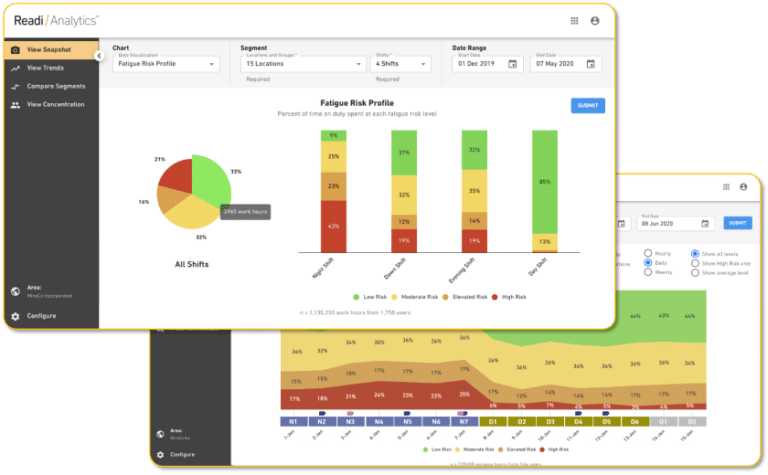
In a large U.S. logistics pilot, the Readi group posted 42% fewer fatigue-linked in-cab telematics events than a matched driver group. For fleets that already rely on wireless commercial vehicle dash cam tools, semi truck dash cam systems, and connected telematics, that change can cut the number of fatigue-related clips that reach the review queue and improve the value of the camera program already in place.
A 42% drop in fatigue-linked events changes more than a dashboard metric. In a large U.S. logistics pilot, that result pointed to a smaller review queue, fewer repeat problem patterns, and less waste from late action.
For fleets that already depend on cameras, telematics, and supervisor follow-up, the operational effect shows up fast. Readi adds a fatigue forecast ahead of dispatch, which gives managers time to adjust assignments, route timing, or task load before another event reaches the safety inbox.
Most safety teams do not struggle with a lack of video. They struggle with volume. Overnight routes, end-of-shift runs, and long duty windows can produce clusters of clips that look different on the surface but trace back to the same issue: reduced alertness.
When fatigue-linked events fall by 42%, the review process becomes more manageable and more useful:
Fatigue shows up in operating cost through poor vehicle control. Late braking, abrupt throttle input, and unstable speed force trucks through extra fuel burn and add stress to high-wear parts.
For a 500-vehicle operation, a 42% reduction in fatigue-linked harsh-driving events can equal about $300,000 in annual fuel savings. The same shift can also ease wear on brakes, tires, and drivetrain parts because trucks spend less time in hard slow-down and catch-up cycles.
Camera programs produce the best return when staff can connect video, location, schedule, and driver data without extra manual work. The value grows when teams can make decisions from a clear picture instead of moving back and forth across separate systems and spreadsheets.
Readi improves that return by giving supervisors on-demand visibility into fatigue risk and performance before the trip starts. That insight supports resource allocation, task planning, worker training, and scheduling, so the rest of the fleet safety technology stack works with better timing and better context.
Post-incident footage helps during a claim, but pre-shift risk records add a different layer of protection. A documented record that shows the fleet assessed fatigue risk, flagged elevated cases, and took action before dispatch gives legal and insurance teams stronger evidence of active oversight.
That record can help on two fronts: lower event frequency across the policy period and a clearer defense when a severe crash leads to scrutiny over supervision, scheduling, or duty of care.
Predictive fatigue management works best as an operating control inside the systems your team already uses each day. For fleets with a commercial vehicle dash cam program in place, the first gains often show up in dispatch decisions, supervisor review, and route assignment.
The rollout should stay practical from day one. Safety leaders need a process that fits linehaul schedules, overnight coverage, and existing fleet safety technology without extra device logistics for drivers.
Start with a pattern review across the event data you already collect. A useful audit looks past total alert volume and focuses on when risk clusters, which assignments carry the most strain, and where a small group of drivers absorbs a large share of review time.
Use your commercial truck camera systems, telematics records, and trip history to check five points:
This first review gives you a cleaner operating picture than a raw list of video events. It also shows where a fatigue model can support trip assignment, task planning, and supervisor attention.
The implementation step should stay close to the systems dispatch already trusts. A predictive fatigue platform should pull duty status, prior rest windows, and trip schedules from the ELD feed so daily risk scores appear without manual updates, paper checks, or a second data entry process.
Readi supports that type of rollout. It gives operations and supervisor teams on-demand visibility into fatigue risk and workforce performance, and it supports decisions on resource allocation, task planning, worker training, and scheduling. That fit is useful for fleets that already run a commercial vehicle dash cam front and rear setup, telematics, and standard driver oversight processes.
Keep the selection review focused on four items:
| Selection criteria | What to confirm | Operational effect |
|---|---|---|
| Schedule data access | Direct pull from ELD duty status, rest windows, and trip timing | Lower admin load; cleaner daily scores |
| Driver-level output | Individual scores for each driver on each day | Better route and shift decisions |
| Deployment load | No wearables, no charging routine, no extra hardware swap process | Faster adoption across night and long-haul fleets |
| Supervisor view | Simple exception list with clear action priority | Shorter review cycle before dispatch |
A platform that only reports team averages will not help a dispatcher choose between two drivers on the same lane. Driver-level output is the part that turns fatigue science into an operating tool.
A workable process keeps attention on a short exception list. Dispatchers and safety staff should not scan every driver record each day; they should act on the smaller group that shows elevated risk before vehicle release.
The workflow can stay tight and repeatable across terminals:
This structure helps teams use predictive fatigue data in the same way they use other fleet controls: as part of normal daily supervision. It also keeps camera review tied to a clear action path instead of a growing backlog of clips.
Once the workflow is live, measure the change against the old process across the same routes, shift types, and vehicle groups. The core metrics do not need to change; the value shows up in the difference between the prior method and the new one.
A strong scorecard usually includes:
| KPI | Formula | What it shows |
|---|---|---|
| Fatigue-linked event rate | Fatigue-linked camera or telematics events / total trips | Whether the fatigue layer lowers event density on the road |
| Overnight exception rate | High-risk overnight shifts / total overnight shifts | Whether the highest-exposure window improves |
| Supervisor action rate | High-risk shifts with a documented action / total high-risk shifts | Whether the workflow gets used consistently |
| Repeat-driver exception count | Drivers with multiple high-risk flags in a set period | Whether chronic exposure drops over time |
| Video review hours | Total manager review time per week | Whether the camera program demands less manual effort |
| Adjusted-shift success rate | Adjusted high-risk shifts with no related event / total adjusted shifts | Whether schedule or route changes reduce downstream alerts |
For large fleets, the clearest read often comes from side-by-side comparison within the same operation: overnight linehaul versus day route, long-distance tractors versus local units, or one terminal versus another. That view shows whether predictive fatigue management improves the value of the commercial vehicle dash cam system already in service.
The most useful dash cam questions usually come up after a fleet moves past the first product search. At that point, the choice is less about a camera on a windshield and more about how the system fits real supervisor work, claim pressure, and fatigue risk across each shift.
The best dash cam for commercial vehicles depends on the failure points inside your operation. A parcel fleet with dense urban stops has different needs than a long-haul carrier that runs overnight between distribution centers, and both differ from a field-service fleet with shared vans and frequent backing.
A strong short list should sort options by operating use case, not by marketing tier:
Many search results for a semi truck dash cam for sale point to consumer units. For fleet buyers, the better test is support depth: install options, replacement process, clip retrieval speed, and whether the camera can expand into a larger safety program without a second hardware change.
Sometimes, but the result often shows up through claim outcome and renewal strength rather than a simple flat discount at install. Insurers and brokers tend to care less about camera presence alone and more about whether the fleet can show consistent use of the footage after an event.
The strongest insurance discussions usually include a clear evidence package:
A fleet that adds fatigue forecasting to video review can show one more layer of control. That record may include pre-shift task changes, route swaps, or dispatch exceptions for drivers with elevated fatigue risk, which can strengthen liability discussions after a severe event.
Dash cams improve fleet safety when the footage changes day-to-day decisions, not only post-crash investigations. In practice, fleets use cameras to spot route-specific hazards, tighten new-hire coaching, and standardize what qualifies as a serious event across terminals.
That value tends to show up in three places that raw telematics alone often misses:
The camera also helps expose patterns that sit below the crash threshold. Repeated late-shift lane corrections, sudden braking near the same mile marker, or recurring distraction alerts before a scheduled stop can point to schedule strain, route design issues, or fatigue buildup that deserves action before loss frequency rises.
In many jurisdictions, yes, but policy design often decides whether the rollout stays smooth or turns into a labor problem. The legal review should cover more than the camera itself; audio rules, cross-border routes, driver notice language, and union conditions can all affect the final setup.
For fleets that operate across states or between the United States and Canada, one practical approach is to build the policy around the stricter rule set. That often means a written notice process, a clear statement on audio status, and a defined purpose for camera use such as crash review, coaching, and claim defense.
Several fleets also separate camera rules by use case. A road-facing-only setup may fit one driver group, while another group may require driver-facing coverage because of overnight operation, high-value cargo, or repeated severe events. That level of policy precision can reduce conflict during rollout and make later enforcement easier to defend.
Any best dash cam for commercial vehicles shortlist should start with a basic technical floor: HD video, cloud access, low-light capability, and event capture that does not rely on manual card retrieval. After that, the decision usually turns on how the camera behaves inside your actual workflow.
A more useful comparison looks like this:
| Fleet condition | Feature priority | Reason |
|---|---|---|
| Slip-seat tractors | Driver identification and shift-level event history | Supervisors need the right event tied to the right person without manual cleanup |
| Night freight lanes | Strong low-light cabin image and reliable upload | Overnight events lose value fast when the clip is dark or delayed |
| Dense metro routes | Auxiliary camera support and short retrieval time | Side impact, curb contact, and parking disputes require faster proof |
| Large multi-terminal fleets | One review queue with searchable filters | Managers need to sort events by terminal, route, driver, and severity |
| High-vibration equipment | Rugged mount, sealed housing, and stable power | Frequent disconnects destroy trust in the system |
For fleets that compare commercial truck camera systems or read dash cam reviews for trucks, the better question is not only which model records video, but which one reduces review friction. A wireless commercial vehicle dash cam that still forces manual clip hunts or split-platform reviews can add work instead of removing it.
Yes. A wearables-free approach fits transportation well because the fleet already has schedule, duty, and route data inside existing systems. That allows a predictive model to score fatigue risk without device charging, device loss, or extra driver steps at sign-on.
Readi follows that model. It gives supervisors on-demand visibility into fatigue risk and workforce performance, then supports decisions on resource allocation, task planning, worker training, and scheduling. For fleets with overnight freight, rotating dispatch patterns, or shared equipment, that structure helps managers act on the highest-risk cases instead of chasing data from every driver.
The operational benefit is straightforward: no spare devices, no battery failures, no collection process at shift end, and fewer adoption problems in union or long-haul environments. That makes predictive fatigue management easier to place next to commercial vehicle dash cam programs that already rely on ELD and telematics data.
A commercial vehicle dash cam earns its place in a fleet when the footage connects to decisions that reduce risk on the next trip, not only on the one already recorded. The fleets that get the most from their camera investment are the ones that pair video evidence with earlier signals, so supervisors can act on schedule risk, assignment fit, and driver readiness before the next clip enters the review queue. Readi forecasts fatigue risk up to 18 hours in advance using existing ELD data, giving dispatchers and safety teams a way to address elevated exposure before it shows up on camera.
Book a demo to explore how predictive fatigue management software can improve safety and productivity across your fleet.
The best dash cam for commercial vehicles depends on your operating conditions—urban delivery fleets prioritize fast video retrieval and backing visibility, while long-haul operations need reliable cellular upload and clear low-light cabin capture. Look for systems that integrate with your existing ELD and telematics platforms rather than creating separate review workflows.
Yes, in most U.S. states and Canadian provinces employers can install dash cams in company-owned vehicles, though some jurisdictions require driver notification or consent for driver-facing cameras. Audio recording has stricter requirements in many states, so many fleets disable audio recording to avoid compliance issues.
Insurance impact typically shows up through improved claim outcomes and renewal terms rather than automatic discounts at installation. Insurers look for evidence that your fleet actively uses footage for coaching and claim defense, and fleets that combine cameras with documented safety programs like predictive fatigue management often see stronger liability protection.
For commercial vans, prioritize systems with rear exterior coverage for backing incidents, side-view options for blind-spot monitoring, and fast cloud upload for quick claim resolution. Urban delivery vans benefit most from cameras that capture low-speed contact events at customer sites and loading docks with clear time and location stamps.