
Product News

A fleet dash cam system is a video-based safety solution built for commercial vehicles that combines road-facing and driver-facing cameras with GPS tracking, AI event detection, and cloud connectivity to help fleets reduce liability, improve driver performance, and investigate incidents. Choosing the best dash cam for fleet vehicles requires understanding the features that matter most for your operation, how these systems integrate with your broader safety technology, and where camera-based tools fit within a complete driver risk management strategy.
A modern fleet dash cam system for commercial vehicles typically combines several hardware and software components into a single platform. The core elements include:
These components work together to give fleet operators a visual record of what happens on the road and inside the cab. The best fleet dash cam system features go beyond simple recording. They include automatic event tagging, configurable alert thresholds, driver scorecards, and the ability to export footage for insurance claims or legal proceedings.
When comparing fleet dash cam system features, safety and operations leaders should focus on several categories that directly affect day-to-day usability and long-term value.
Video quality and storage. Look for systems that record in at least 1080p resolution with wide-angle lenses. Cloud storage capacity and retention policies vary by provider, so confirm how long footage is stored and whether you can download clips for offline use.
AI and event detection accuracy. An AI dash cam for fleets should reliably distinguish between true safety events and false positives. High false-positive rates create alert fatigue for safety managers, which reduces the effectiveness of the entire system. Ask vendors about their false-positive rates and how the AI model is trained.
GPS and route context. A fleet dash cam with GPS allows you to overlay video events on a map, showing exactly where an incident occurred, how fast the vehicle was traveling, and what route the driver was following. This context is essential for coaching conversations and claims defense.
Fleet dash cam system installation. Installation complexity varies. Some systems are plug-and-play units that connect to the OBD-II port, while others require professional installation with hardwired power connections and multiple camera mounts. For large fleets, professional installation is common and can take 30 to 90 minutes per vehicle depending on the configuration.
Integration with existing tools. The most effective fleet safety technology stacks connect dash cams with ELD platforms, telematics systems, and driver management software. Confirm that the system you choose offers API access or native integrations with the platforms your fleet already uses.
The benefits of using dash cams in commercial fleets fall into several measurable categories.
Liability protection and insurance. Video evidence from a fleet dash cam system can exonerate drivers in not-at-fault collisions, protect your company in litigation, and support insurance claims. Many fleet insurance providers offer premium reductions for fleets that use camera systems, though the discount amount varies by carrier and coverage type. Contact your insurer directly to confirm whether a dash cam program qualifies for a rate reduction.
Driver coaching and performance improvement. Event-triggered video gives safety managers specific, objective footage to use in coaching sessions. Rather than relying on general feedback, managers can show a driver exactly what happened during a harsh braking event or a close following incident. This specificity makes coaching conversations more productive and less adversarial.
Incident investigation. When collisions or near-misses occur, dash cam footage provides a factual record that removes ambiguity. This speeds up claims resolution and helps safety teams identify root causes.
Reduced unsafe driving behaviors. Fleets that deploy camera systems consistently report reductions in harsh braking, rapid acceleration, and distracted driving events over time. These reductions translate into lower fuel costs, less vehicle wear, and fewer at-fault incidents.
A fleet dash cam system is a strong reactive and investigative tool. It captures what happens during a safety event and provides the footage needed to coach drivers after the fact. For many fleets, cameras are the foundation of their safety technology investment.
The limitation of any camera-based system is that it records and alerts on events that have already occurred on the road. A harsh braking alert means the driver was already in a situation that required emergency action. A distraction alert means the driver's attention had already left the road. The camera captures the moment of risk, but the risk was already present.
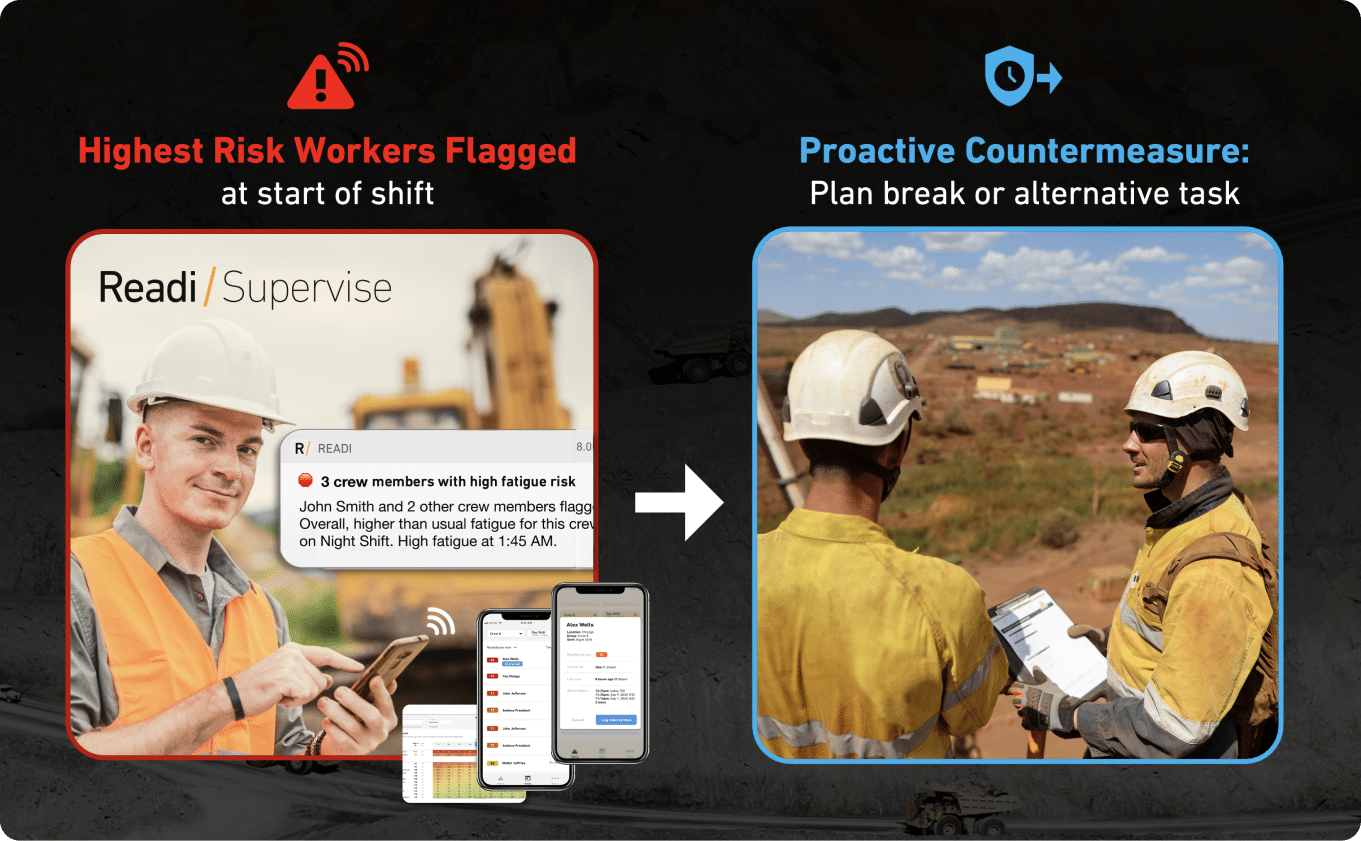
This is where leading indicators become valuable. Fleets that want to move beyond reactive alert management can layer predictive tools on top of their existing camera and telematics systems. For example, predictive fatigue management software like Readi analyzes sleep and schedule data through validated biomathematical models to forecast driver fatigue risk up to 18 hours in advance, giving dispatchers and safety managers a way to intervene before a fatigued driver ever triggers a camera alert. This type of integration does not replace the dash cam. It makes the dash cam investment more effective by reducing the volume of events that reach the camera in the first place.
Fleet dash cam system price varies based on hardware configuration, subscription model, and fleet size. Most commercial providers use a per-vehicle monthly subscription that includes hardware, cloud storage, AI analytics, and support. Typical pricing ranges include:
| Cost Component | Typical Range |
|---|---|
| Hardware per vehicle (upfront or bundled) | $100–$500+ |
| Monthly subscription per vehicle | $20–$60 |
| Professional installation per vehicle | $50–$150 |
| Cloud storage and analytics | Often included in subscription |
Some vendors bundle hardware costs into the monthly subscription, while others require an upfront purchase. Multi-year contracts often reduce the per-vehicle monthly rate. When evaluating fleet dash cam system price, account for total cost of ownership including installation, data plan fees, and any overage charges for video storage or downloads.
Selecting the right system depends on your fleet's size, operational profile, and safety maturity. Use these criteria to narrow your evaluation:
What are the best features to look for in a fleet dash cam system?
Prioritize HD video quality (1080p minimum), AI-powered event detection with low false-positive rates, GPS integration for location context, cloud-based storage with flexible retention, and native integration with your existing ELD and telematics platforms.
How much does a fleet dash cam system typically cost?
Most commercial fleet dash cam systems cost between $20 and $60 per vehicle per month on a subscription basis. Hardware may be bundled into the subscription or purchased separately for $100 to $500 per vehicle. Installation adds $50 to $150 per vehicle if done professionally.
What are the benefits of using dash cams in commercial fleets?
Dash cams provide video evidence for liability protection and insurance claims, enable specific and objective driver coaching, reduce unsafe driving behaviors over time, and help fleets lower fuel costs by decreasing harsh braking and rapid acceleration events.
How do I install a fleet dash cam system?
Installation depends on the system. Plug-and-play units connect to the vehicle's OBD-II port and can be self-installed. Hardwired systems require professional installation, which typically takes 30 to 90 minutes per vehicle. For large deployments, vendors often provide installation services or partner with certified installers.
Will having a dash cam reduce my fleet's insurance premiums?
Many insurance carriers offer discounts for fleets that use dash cam systems, but the discount amount varies. Contact your insurer to confirm eligibility. Beyond premium reductions, dash cam footage can significantly reduce claims costs by providing clear evidence in disputed incidents.
A fleet dash cam system is a managed camera program for company vehicles, not a standalone recorder for one driver. The system places standardized video hardware across a truck, van, bus, or service unit fleet and connects each device to a shared back-office platform with set rules for capture, retention, search, and review.
In practice, that means the camera becomes part of fleet operations. A safety manager can pull the same type of event file from a long-haul tractor in one state, a delivery van in another, and a transit vehicle on a city route without waiting for someone to hand over a memory card from the cab.
A dash cam for commercial vehicles has to match fleet conditions that consumer devices rarely face. Daily vibration, long duty cycles, heat, low-light routes, shared vehicles, and frequent driver changes all shape how the system gets built, mounted, and managed.
Commercial platforms usually support vehicle classes such as:
The unit usually sits near the windshield on an adhesive bracket and draws power from the vehicle so the camera starts with the vehicle rather than with driver input. Most systems pair video with GPS, accelerometer data, g-sensor readings, and a cellular modem, which lets the platform flag a hard brake, impact, shock event, or route exception and send that record to a web dashboard.
That record often includes more than a short clip. It may also include vehicle ID, date, time, route position, speed, and driver assignment, which gives supervisors a cleaner file for post-incident review, insurer follow-up, internal safety review, or service verification.
Consumer units focus on local capture for personal use. A fleet dash cam with GPS focuses on administrative control across dozens or hundreds of vehicles.
| Criteria | Retail Dash Cam | Fleet Dash Cam System |
|---|---|---|
| Device scope | One vehicle, one owner | Many vehicles under one policy set |
| Footage access | Local card retrieval from the cab | Central portal access for office teams |
| Data attached to video | Limited trip context | Vehicle, driver, time, speed, and route records |
| Review workflow | Manual file search | Event queue, filters, and user permissions |
| Operational fit | Personal commuting | Freight, field service, delivery, and transit work |
This distinction affects fleet dash cam system reviews more than lens specs alone. For a fleet buyer, the key question is whether the platform can deliver consistent records, support quick review, and fit existing fleet safety technology without extra manual work after every incident.
For many fleets, the camera system becomes the visual record inside a larger operating file. Dispatch may use it to confirm route activity, safety may use it for remedial training, risk may use it for claim support, and operations may use it to confirm service delivery or stop location.
That broader role explains why fleet dash cam system features often sit close to telematics, ELD records, and exception reporting. The device does not serve only as a lens on the windshield; it serves as a structured record source that helps fleets track conduct on the road, document events with more precision, and maintain a clearer audit trail across the whole operation.
A useful camera program depends on the review workflow as much as the hardware. Safety teams need clips they can sort fast, context they can trust, and settings that match the way their vehicles actually run.
For long-haul trucks, service fleets, transit vehicles, and night-route operations, the strongest fleet dash cam system features support quick decisions in the field and clear follow-up in the office. The gap between a basic recorder and a commercial platform usually shows up in alert quality, camera coverage, data access, and system fit with the rest of the fleet stack.
AI has changed what a dash cam for commercial vehicles can flag before a manager ever opens a clip. Stronger systems use road-facing advanced driver assistance functions and in-cab driver monitoring to identify specific behaviors such as tailgating, lane departure, phone distraction, smoking, seat belt non-use, and fatigue-related head-drop patterns.
The alert itself also deserves close review. A system that speaks to the driver in the cab, or shows an immediate warning on screen, can help correct behavior during the trip instead of leaving the issue for a coaching session days later. That distinction carries weight in fleets with dense urban routes, tight schedules, or overnight miles where a few seconds of delay can turn a near miss into a claim.
A short checklist helps separate useful AI from noisy AI:
A fleet dash cam with GPS should do more than stamp coordinates on a video file. The stronger systems tie each event to a trip path, vehicle speed, heading, and time sequence so a reviewer can place the clip inside the full trip instead of looking at an isolated moment.
That level of context supports more than crash review. GPS-linked video can verify arrival at a customer site, confirm route compliance, document entry into a geofenced yard, and settle disputes about service windows. For operations teams, this can turn the camera from a safety device into a record of what the vehicle did, where it went, and what conditions surrounded the event.
Good location tools usually include:
Camera layout should reflect vehicle exposure, route complexity, and driver acceptance. A road-facing unit often works well for fleets that want forward-scene evidence, collision documentation, and lane-related alerts without recording the inside of the cab except where policy requires it.
Driver-facing coverage adds a different layer. It helps fleets review phone handling, seat belt use, eye-off-road behavior, and signs of reduced alertness in the seat. Dual-facing hardware brings both views into the same event record, which can help during coaching, claim review, and disputes over what took place just before impact.
Auxiliary cameras expand coverage around the vehicle where mirrors and a single windshield unit fall short. Side cameras help on turns and lane changes, rear cameras support backing and yard work, and cargo or interior views add visibility for high-value loads, passenger areas, or service verification.
| Configuration | Best use case | Primary advantage |
|---|---|---|
| Road-facing | Claims defense, privacy-sensitive fleets, lighter duty vehicles | Clear view of traffic, signals, and roadway conditions |
| Driver-facing | Policy enforcement, distraction review, fatigue-sensitive routes | Direct view of in-cab behavior |
| Dual-facing | Delivery, transit, line-haul, mixed route fleets | Shared record of roadway and driver actions |
| Multi-camera | Vocational trucks, buses, specialty fleets, high-value cargo | Wider exterior coverage and fewer blind spots |
Image quality affects whether a clip settles a dispute or creates another one. For front video, full-HD capture should serve as the practical floor for claim review, road-sign clarity, and plate visibility in daylight conditions. Wide-angle lenses also deserve attention because a narrow field can miss adjacent lanes or shoulder movement that shaped the event.
Low-light performance becomes more important in fleets that run before sunrise, after dark, or through poor weather. Infrared support inside the cab can preserve detail during overnight shifts when the cabin stays dark, while exterior low-light tuning helps maintain usable footage on rural roads, in yards, and at dim loading sites.
Storage and access can create just as much friction as poor video. Commercial systems should push event footage to the cloud without a manual card pull, and the dashboard should let a manager search by trip, driver, timestamp, map location, and event category. Extra functions such as manual record buttons, live stream access, and long-duration recording windows can help fleets that need proof of service or a fuller view around a serious incident.
A camera platform should sit inside the same operating workflow the fleet already uses for safety review and dispatch follow-up. The best dash cams for fleet vehicles connect with telematics, ELD data, and vehicle information so a supervisor can review a clip alongside route history, harsh-event records, and duty status in one place.
That setup reduces tab switching and helps each team use the same evidence. Safety can review the clip, operations can check the route and stop sequence, and compliance can reference the duty record without a separate export from each system. In larger fleets, this can shorten investigation time and make coaching notes more consistent across terminals.
Fleets that already invest in cameras, telematics, and fit-for-duty processes often look for one more layer before the trip starts. Readi fits that role by giving supervisors on-demand visibility into fatigue risk and workforce performance, which can inform resource allocation, task planning, worker training, and scheduling decisions before a driver reaches a high-risk stretch of the route.
Once a fleet dash cam system is live across commercial vehicles, the return tends to show up in response speed, record quality, and manager time. For fleets that run overnight freight, service routes, or high-mileage delivery schedules, those gains affect claims handling, maintenance planning, coaching throughput, and route control.
The strongest dash cam benefits for fleets usually come from systems that connect video, GPS, and event data in one place. A searchable record gives safety and operations teams a usable trail: where the truck was, how fast it moved, what the road looked like, and what the driver did in the seconds before the event.
In car-truck collisions, trucks are only at fault about 26% of the time, yet commercial fleets often face immediate scrutiny after a crash. A fleet dash cam with GPS helps preserve the sequence of events before accounts change; lane position, traffic flow, signal timing, weather, and evasive action all stay attached to the record.
A commercial-grade video file also improves how fleets move through the first hours after an incident:
For large fleets, the administrative value is substantial. A searchable dashboard reduces the need to pull memory cards, track down a specific unit, or wait for a manual file transfer before the investigation can start.
Coaching quality improves when supervisors can sort risk by severity, driver, route, and event type. The best dash cam for fleet vehicles supports that workflow by pushing the most relevant clips to the top of the review queue instead of forcing managers to scan long stretches of uneventful footage.
That shift affects both driver performance and equipment cost:
Fleets usually track these gains with a small set of operating measures. A fleet dash cam system price looks different when the review workload, service intervals, and repeat-event trends sit next to the monthly subscription.
| Operating area | Useful measure | What teams should watch |
|---|---|---|
| Claims response | Time from event to clip access | Delay between incident and file review |
| Coaching workload | High-severity clips per manager | Review backlog by driver or terminal |
| Vehicle wear | Brake or tire exceptions | Repeat harsh driving by route or shift |
| Behavior change | 30-day repeat event rate | Whether coaching holds after follow-up |
| Service verification | Stop or route confirmation rate | Customer disputes and missed-location claims |
An AI dash cam for fleets adds a layer of operational detail that standard recording cannot provide on its own. It can identify behaviors such as phone distraction, tailgating, lane drift, seat belt issues, and drowsiness cues, then tie those clips to trip history and map data. That makes it easier to spot risk clusters on final-mile routes, in dense urban corridors, at customer yards, or during late-night runs.
This level of visibility helps beyond the safety office. Dispatchers can compare route design with actual exposure, terminal managers can review high-alert windows by shift, and operations leaders can verify service patterns without relying on anecdotal reports. The footage becomes more useful when paired with trip context such as stop sequence, dwell time, and route deviations.
Fatigue often sits behind the driving patterns cameras surface, especially in transportation environments with night work, irregular start times, and long duty periods. Readi supports that broader view by giving supervisors on-demand visibility into fatigue risk and workforce performance, which can inform task planning, resource allocation, training, and scheduling decisions before the route creates a higher-exposure moment.
Fleet dash cam system price usually follows one of three commercial models: upfront hardware purchase, hardware bundled into a service contract, or a camera package added onto an existing telematics account. The quote changes quickly once a fleet adds driver-facing video, auxiliary cameras, live viewing, or long video retention.
A road-only unit sits at the low end of the market. A full AI dash cam for fleets with dual-facing video, in-cab alerts, LTE upload, and optional side or rear cameras moves into a different budget category because the platform has to store, process, and sort more video across more event types.
Most providers package cost in layers rather than a single flat number. A purchasing team usually sees some mix of the following:
A low quote can also hide limits. Some plans restrict clip length, retention days, or the number of pulled videos per month. Others charge extra for weekend installs, replacement mounts, or advanced reporting.
The number of cameras per vehicle has the biggest effect on spend, but it is not the only one. Video strategy has a direct effect on both monthly fees and administrative load.
Common price increases come from these choices:
For large rollouts, labor cost can shift from the install itself to scheduling. A fleet with tight dispatch windows may pay more for night work, yard coordination, or phased deployment that avoids service interruptions.
The cleanest comparison uses a 12 to 36 month view. That approach shows whether a lower upfront price turns into a higher operating cost once storage, data, and service limits appear.
| Quote Element | What to verify |
|---|---|
| Video access | Event-only clips, on-demand retrieval, or live view |
| Retention policy | Number of days kept in the cloud and any archive fees |
| Camera scope | Road-facing only, dual-facing, or support for side/rear/cargo views |
| Data plan | Included upload volume, throttling rules, and live-stream charges |
| Installation scope | Self-install, certified install, after-hours scheduling, and vehicle downtime |
| Support terms | Hardware replacement process, warranty period, and training included |
| Integration fees | Any cost to connect video with telematics, ELD, or dispatch systems |
Fleet dash cam system reviews often reveal the real cost issues that do not show up on page one of a proposal. The most common problem areas are slow video retrieval, extra storage charges, limited support during rollout, and dashboards that force managers to jump between separate systems. A stronger quote usually shows exactly how footage is stored, how clips are retrieved, and how the dash cam for commercial vehicles fits into the rest of the fleet safety technology already in place.
A fleet dash cam system installation plan affects footage quality, vehicle uptime, and driver acceptance from day one. In linehaul, delivery, transit, and service fleets, the install process has to fit around dispatch windows, maintenance schedules, and route commitments without creating avoidable gaps in coverage.
Most commercial camera units mount to the windshield with an adhesive bracket. That mount type stays in place better than a suction cup, holds camera angle through vibration and temperature swings, and gives fleets a more tamper-resistant setup across trucks, vans, and buses.
Camera scope should match the vehicle’s risk profile before the first bracket goes on the glass. A road-facing unit suits fleets that want collision evidence and route context, while a dual-facing or auxiliary camera layout fits operations that need visibility into in-cab behavior, backing risk, side blind spots, or cargo handling.
| Vehicle setup | Typical camera layout | Install focus | Common use case |
|---|---|---|---|
| Long-haul tractor | Road-facing or dual-facing | Windshield position, stable horizon line, keyed power | Collision review, fatigue-related event review, claims defense |
| Delivery van | Dual-facing | In-cab angle, route density, stop-and-go event capture | Coaching, service verification, harsh event review |
| Transit or shuttle vehicle | Road-facing plus interior coverage | Wider field of view, passenger area visibility | Incident documentation, passenger disputes, operator oversight |
| Utility or vocational truck | Road-facing plus side or rear camera | Blind spot coverage, backing visibility, equipment area view | Tight-space maneuvering, jobsite exposure, proof of service |
Most systems connect to vehicle power so recording starts with ignition and stops when the vehicle shuts down. Self-calibrating cameras reduce setup time across large deployments because the camera can align core settings without repeated manual adjustment at each vehicle.
The install team should reflect the hardware package, the vehicle class, and the shop’s electrical skill level. A single-camera rollout across a standard light-duty fleet often fits an internal maintenance team once the mount position and cable path are documented. A more involved setup with driver-facing video, auxiliary cameras, or a rear monitor usually benefits from a trained installer who works with that hardware every day.
Consistency across the fleet often creates more value than speed on the first batch. One truck with a clean field of view and reliable upload settings is more useful than ten trucks with misaligned lenses, loose trim panels, or poor cable routing.
Use a simple decision rule before launch:
A completed install is not ready for service until the device passes a yard test. The goal is simple: confirm that the camera sees the right area, the event triggers work as intended, and the platform receives usable clips with the correct vehicle and trip information attached.
A short validation routine helps catch the most common deployment problems:
For a fleet dash cam with GPS, the location trail should line up with the clip timeline. A mismatch between video time and map time can weaken coaching records, claims files, and internal investigations.
Large fleets usually get better results from a phased rollout than from a full-fleet launch. A pilot group gives safety managers time to tune event thresholds, confirm storage settings, and decide which alerts deserve supervisor review versus automatic archive.
The first phase should focus on vehicles or routes with the highest exposure. Overnight lanes, dense urban delivery routes, severe-weather corridors, and units with a recent pattern of harsh events usually provide the fastest operational feedback. That approach also helps safety teams learn what camera footage adds to existing telematics data instead of flooding the review queue all at once.
Driver preparation should happen before the install date, not after the first alert. Written policy should state camera orientation, whether audio is enabled, how long event clips stay available, and what types of events enter coaching review. Fleets that define those rules early tend to avoid confusion once clips begin to appear in daily workflows.
Installation scheduling should follow the operating rhythm of the fleet. The cleanest rollouts use planned maintenance windows, spare vehicles, or off-shift shop hours so route capacity does not fall during deployment.
A practical schedule usually includes five steps:
A rushed schedule often produces the same problems across dozens of vehicles. A controlled schedule gives fleets cleaner footage, fewer repeat shop visits, and a more reliable start for the safety program.
A fleet dash cam system shows what took place in front of the windshield or inside the cab, but it does not show the full exposure profile behind the trip. Safety teams still need to account for shift timing, prior sleep opportunity, route difficulty, weather, workload, and hours already on duty.
That gap shows up most clearly in night transport, long regional runs, and service fleets with early dispatch times. A dash cam for commercial vehicles may capture a late lane correction or a hard stop; it cannot tell a supervisor that a driver came into that shift with poor recovery from the prior two nights.
An AI dash cam for fleets can flag phone use, tailgating, seat belt issues, or signs tied to reduced alertness. Those functions improve event detection, yet they still depend on the driver already being in motion and already exposed to traffic, speed, and route risk.
That creates several blind spots inside a camera-only program:
For fleets that move freight through the night, those missing inputs affect more than safety review. They affect dispatch choices, task assignment, break planning, and supervisor workload across the week.
Many fleets buy cameras to reduce uncertainty, then run into a different problem: too many clips with too little prioritization. Event queues often fill with low-severity triggers, duplicate views of the same incident, or alerts that need manual context before a manager can judge actual risk.
In that environment, coaching can lose precision. The safety team spends time sorting video instead of spotting patterns across routes, schedules, and drivers. Fleet dash cam system reviews often focus on AI accuracy for this reason; false positives and low-value alerts do not just waste time, they also weaken trust in the process.
| Review Burden | Operational Effect | Safety Impact |
|---|---|---|
| High clip volume | More time in event triage | Less time for targeted coaching |
| Weak prioritization | Delays in manager response | Repeated high-risk behavior may continue |
| Limited context outside video | More back-and-forth with dispatch and ops | Slower corrective action |
A mature fleet safety technology stack needs more than proof of what took place on the road. It needs tools that help leaders plan around risk before the truck leaves the yard. That includes route design, task timing, worker training, and schedule decisions tied to likely fatigue exposure.
Readi fits that upstream role. It provides on-demand visibility into workforce fatigue risk and performance, helps operations leaders with resource allocation and task planning, and gives supervisors a way to understand, track, and improve fatigue levels across teams. In a transport environment, that means a dispatcher can act on risk earlier instead of waiting for a camera event to confirm that a problem reached the road.
The best dash cam for fleet vehicles still plays an important role, especially for claims defense, proof of service, and event-based coaching. The strongest results come from a connected model in which each tool handles a different part of the job.
A practical setup usually includes:
For fleets with overnight operations, rotating demand, or fatigue-related exposure, cameras alone leave too much of the risk picture outside the frame.
A fleet dash cam system purchase often moves from a camera discussion to a workflow discussion very quickly. Safety leaders, dispatch teams, and claims staff all use the output in different ways, so the right questions reach beyond lens quality and monthly price.
The points below focus on practical differences that show up after deployment: review speed, supervisor workload, driver acceptance, and fit with a broader fleet safety technology stack.
The most useful fleet dash cam system features are the ones that shorten review time and expand usable context. In many fleet dash cam system reviews, the strongest systems stand out because they sort urgent events first, allow search by map or trip history, and support more than one camera view when a single forward lens leaves gaps.
A good short list includes:
For an AI dash cam for fleets, ask for a live view of the review queue, not only a feature sheet. That reveals whether the system helps the team move through real incidents with speed and discipline.
A fleet dash cam system price often shifts more with service level than with camera hardware alone. Two quotes may look similar at first glance, yet one may cover event clips only while the other includes live stream access, longer retention, extra cameras, and broader support.
Cost usually changes based on five factors:
For a useful comparison, ask each vendor to quote the same package terms: same number of cameras, same storage window, same install assumptions, and same support level. That keeps the fleet dash cam system price discussion tied to actual operating needs rather than headline numbers.
The most durable dash cam benefits for fleets tend to appear in places where telematics alone leaves uncertainty. Video can show lane position, traffic behavior around the vehicle, cargo movement, and driver response during a dispute or service complaint.
Beyond collision review, fleets often gain value in these areas:
For a dash cam for commercial vehicles, the biggest gain is often clarity. Claims, operations, and safety teams work from the same visual record instead of separate interpretations.
A strong fleet dash cam system installation plan starts before any hardware enters a vehicle. Camera angle, wire routing, power source, and post-install checks all vary by cab layout, windshield shape, and whether the unit includes side or rear views.
Most fleets benefit from a checklist that covers:
For larger fleets, a staged rollout usually works better than a full-fleet switch at once. A pilot at one terminal can expose wiring issues, placement problems, or review bottlenecks before the broader install schedule starts.
It can help, but carriers usually look beyond the camera itself. Underwriters often want to see a documented process around footage retention, event review, supervisor action, and repeat-offender follow-up before they treat the system as a meaningful control.
A fleet is in a stronger position when it can show:
Some insurers may offer credits, discounts, or hardware support. Others may place more value on claim defense strength than on an immediate premium cut. In either case, the camera program carries more weight when it operates as part of a managed safety process.
Most commercial systems can connect with GPS and telematics, but the depth of that connection varies a lot. A basic link may show vehicle location beside a clip, while a stronger setup can tie footage to driver assignment, stop history, route deviations, harsh events, and other exceptions inside one workflow.
When fleets compare a fleet dash cam with GPS, they should look at how the data actually appears during review. The most useful setups support map-based search, trip replay, event lookups by location, and shared access across safety, dispatch, and claims teams. Some platforms also allow rules that trigger or bookmark footage based on telematics exceptions rather than camera logic alone.
That difference shows up fast in daily use. A system that pairs video with trip context can help a manager find a specific lane-change complaint or service stop in minutes rather than dig through separate tools.
Some cameras can flag visible fatigue signs such as prolonged eye closure, repeated head drop, or loss of road focus. Those alerts can help after fatigue becomes observable in the cab, which limits how much time a supervisor has to act.
For fleets that run overnight, long-distance, or weather-exposed routes, a broader fatigue layer adds value upstream. Readi gives supervisors on-demand visibility into workforce fatigue risk and performance, and it can inform resource allocation, task planning, worker training, and scheduling decisions before a fatigue issue turns into a video event. That makes the camera record more useful because fewer high-risk situations reach the point where the only evidence is a clip after the fact.
Fleets that already invest in cameras, telematics, and ELD systems have built a strong foundation for capturing what happens on the road. The next step is adding visibility into risk that forms before the trip starts. Readi forecasts fatigue risk up to 18 hours in advance, requires no wearables or new hardware, and integrates with existing ELD platforms so supervisors can act on elevated risk during scheduling and dispatch rather than after a camera flags an event in traffic. In a large U.S. logistics pilot, fleets using Readi reduced fatigue-linked in-cab telematics events by 42% compared with an identical driver group.
A camera records the moment of risk. A predictive fatigue layer helps prevent that moment from occurring in the first place.
Book a demo to explore how predictive fatigue management software can improve safety and productivity across your fleet.
What are the best features to look for in a fleet dash cam system?
Prioritize event ranking by severity, auxiliary camera support for blind spots, infrared capability for night routes, tamper-resistant hardware, manual event tagging, and search tools that filter by trip, driver, vehicle, or route segment rather than alert type alone.
How much does a fleet dash cam system typically cost?
Monthly subscription fees range from $20 to $60 per vehicle, hardware costs run $100 to $500 per unit, and professional installation adds $50 to $150 per vehicle, with total cost varying based on camera layout, video policy, connectivity level, and vehicle type.
What are the benefits of using dash cams in commercial fleets?
Dash cams provide video evidence for liability protection and claims defense, enable specific driver coaching with objective footage, verify customer service and stop compliance, reduce backing and yard incidents through additional camera views, and create a shared visual record across safety, operations, and claims teams.
How do I install a fleet dash cam system?
Build vehicle-specific templates for consistent placement, secure cables away from airbags and sharp edges, confirm sightlines avoid obstructions, pull test clips to verify framing and alert function, and stage rollouts by terminal to identify wiring or review issues before full deployment.
Will having a dash cam reduce my fleet's insurance premiums?
Some carriers offer premium reductions, but underwriters typically require documented processes around footage retention, event review timelines, coaching records tied to clips, and evidence the program applies fleet-wide rather than just a pilot group.
Can a fleet dash cam system integrate with GPS tracking and telematics?
Most commercial systems connect with GPS and telematics, with stronger integrations tying footage to driver assignment, stop history, route deviations, harsh events, and exceptions in one workflow that supports map-based search and trip replay.
Do dash cams detect driver fatigue?
Some cameras flag visible fatigue signs such as prolonged eye closure or head drop after fatigue becomes observable, but predictive fatigue management tools like Readi forecast risk for 18 hours, allowing intervention during scheduling rather than after an event occurs.