
Product News

In-cab cameras are vehicle-mounted camera systems used in commercial fleets to record driver behavior and road conditions, helping fleet managers improve safety, support driver coaching, and manage risk. These vehicle camera systems have become a core part of fleet safety technology for trucking companies, logistics providers, and other commercial operations.
For fleet managers, safety officers, and trucking company owners evaluating this technology, the decision involves more than choosing a camera model. It requires understanding how different camera types work, what legal requirements apply, how to measure dash cam ROI, and where cameras fit within a broader safety program. This guide covers each of those areas in detail.
In-cab cameras typically mount on the windshield or dashboard and record video in one or more directions. A road-facing lens captures traffic, lane position, and forward events. Driver facing cameras point inward to monitor the operator for signs of distraction, drowsiness, phone use, or seat belt non-compliance. Many modern systems combine both views in a single dual-facing unit.
AI dash cams add a layer of automated detection on top of standard video recording. These systems use computer vision algorithms to identify specific behaviors or events in real time, such as hard braking, following too closely, lane departure, or a driver looking away from the road for an extended period. When the system detects a triggering event, it saves a short video clip and flags it for review by a safety manager or dispatcher.
Most in-cab cameras connect to a fleet's telematics platform or a cloud-based portal. This allows safety teams to access footage remotely, search for specific event types, and use video as part of structured driver coaching programs.
Fleet operators can choose from several configurations depending on their goals, budget, and privacy considerations.
| Camera Type | What It Records | Primary Use Case |
|---|---|---|
| Road-facing only | Forward view of traffic and road conditions | Incident documentation, claims defense, exoneration |
| Driver-facing (inward facing cameras) | Interior cab view of the operator | Behavior monitoring, distraction detection, coaching |
| Dual-facing | Both road and interior views simultaneously | Combined safety monitoring and incident review |
| Multi-camera | Cabin, road, sides, and cargo areas | Full-coverage recording for high-risk or high-value operations |
| AI-enabled dash cams | Any combination above with automated event detection | Real-time alerting, prioritized video review, coaching workflows |
Each configuration carries different implications for cost, data volume, driver acceptance, and the level of safety insight it provides. Fleets running long-haul or overnight operations often select dual-facing or AI-enabled systems because fatigue-related risk is harder to detect without an inward view.
Incident documentation and claims defense. Recorded footage provides objective evidence during accident investigations and insurance disputes. Fleets that can show clear video of an incident are better positioned to dispute false claims and reduce liability exposure. Many insurers recognize camera-equipped fleets as lower risk, which can lead to more favorable premium negotiations.
Driver coaching and behavior improvement. One of the strongest dash cam benefits is the ability to use real event footage in coaching conversations. Rather than relying on abstract safety talks, managers can show a driver exactly what happened during a harsh braking event or a close following incident. This specificity makes coaching sessions more productive and helps drivers connect their behavior to measurable outcomes. Driver coaching tools built into camera platforms often include scorecards, trend tracking, and structured feedback workflows.
Reduced safety events over time. Fleets that implement in-cab cameras alongside consistent coaching programs typically see a reduction in risky driving behaviors. Hard braking, rapid acceleration, and distracted driving events tend to decrease as drivers become aware that footage is being reviewed and used constructively.
Operational cost savings. Safety events carry direct financial costs. Each harsh braking event, for example, wastes fuel because the vehicle must re-accelerate to speed. Across a large fleet, the cumulative fuel cost of frequent hard braking adds up. Reducing these events through camera-based coaching and monitoring contributes to measurable dash cam ROI.
Exoneration in not-at-fault incidents. Road-facing footage can quickly prove a commercial driver was not at fault in a collision or near miss. This protects both the driver and the company from wrongful liability, and it speeds up insurance claim resolution.
In-cab camera laws vary by jurisdiction, and fleet operators need to understand the rules that apply in every state or province where their vehicles operate.
In the United States, most states allow the use of driver facing cameras in commercial vehicles. The primary legal considerations involve consent and audio recording. Video-only recording is broadly permitted, but recording audio inside the cab triggers wiretapping and eavesdropping laws in certain states. Some states require one-party consent (meaning the employer can record if they are a party to the conversation), while others require all-party consent.
Key legal factors for fleets to evaluate include:
Fleets operating across multiple jurisdictions should work with legal counsel to build a compliance matrix that accounts for each state's requirements.
In-cab cameras are one component of a multi-layered fleet safety technology stack. Most fleets also use electronic logging devices (ELDs) for hours-of-service compliance, telematics platforms for vehicle tracking and diagnostics, and structured coaching programs to address driver performance.
Cameras excel at capturing what happens during and immediately after a safety event. They show the behavior, the context, and the outcome. This makes them strong tools for reactive safety management: reviewing events after they occur and coaching drivers to prevent recurrence.
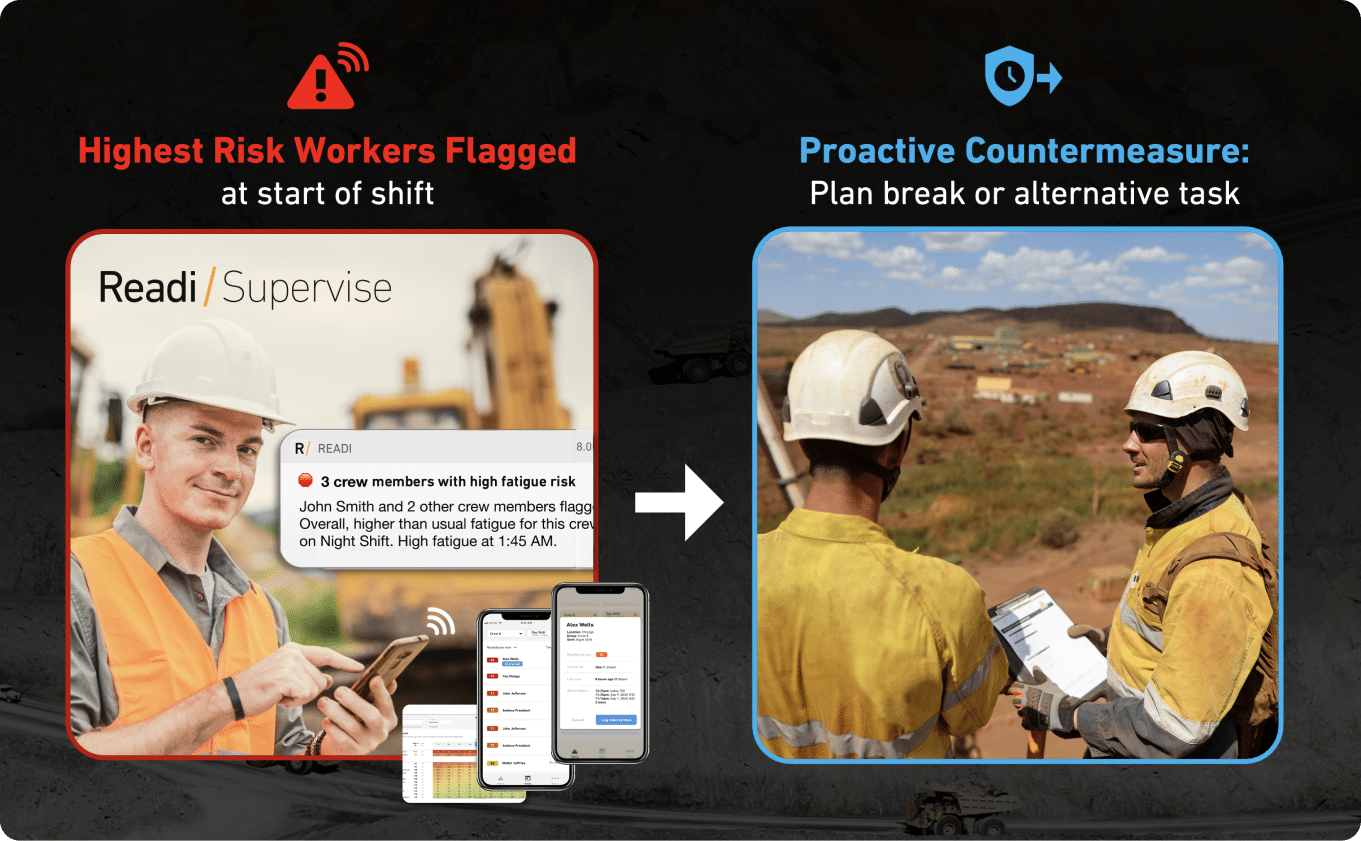
One area where camera systems face a natural limitation is in identifying risk before it appears on the road. A camera detects drowsiness or distraction once the driver is already showing visible signs. By that point, the risk is active. Fleets focused on building a more proactive safety posture are beginning to pair camera systems with predictive tools that assess risk earlier in the timeline. For example, predictive fatigue management software like Readi can forecast elevated fatigue risk up to 18 hours before a shift begins by analyzing sleep and schedule data from ELD integrations, giving supervisors the opportunity to intervene before a fatigued driver gets behind the wheel.
This distinction between reactive and predictive safety tools matters because it determines when intervention happens. Cameras catch risk in the moment. Predictive tools flag risk in advance. The strongest safety programs use both.
Fleet leaders evaluating in-cab cameras need a clear framework for measuring return on investment. The following categories capture the primary financial and operational impacts:
Driver acceptance remains one of the most frequently cited challenges when fleets deploy inward facing cameras. Drivers may view the technology as invasive surveillance rather than a safety tool. Addressing this concern requires clear communication about how footage is used, who has access to it, and what protections are in place.
Fleets that achieve high adoption rates tend to share a few practices:
When evaluating vehicle camera systems, fleet decision-makers should consider the following factors:
In-cab cameras are a proven and widely adopted component of commercial fleet safety. Their value increases when they are part of a coordinated safety strategy that includes strong coaching practices, clear policies, and complementary tools that address risk at different points in the timeline.
A useful camera program starts with a workflow, not with hardware. Each saved clip should lead to a defined next step: protect a driver in a disputed incident, coach a repeat behavior, or change a schedule, route, or task plan before the next run.
Video on its own rarely gives a full operating picture. A fleet gets better results when in-cab cameras sit alongside telematics, ELD records, and fatigue risk insight, so the review team can see the event, the vehicle response, the duty pattern, and the work conditions in one place.
Many fleets begin with camera footage because the value shows up fast in incident review and false-claim defense. The program usually grows from there into a broader safety process that supports pre-shift checks, tighter supervisor review, and earlier action on high-risk runs.
Most vehicle camera systems save short clips around a trigger such as hard braking, sudden swerving, or impact. That clip should act as the first record in the review, not the only one; the supervisor should also see route position, speed change, duty status, and recent event history for that driver.
This approach keeps the safety team out of a clip-by-clip routine that burns time without improving decisions. One hard brake in dense city traffic may need no action, while three late-response clips on the same overnight lane can point to a larger issue in schedule design, workload, or fatigue exposure.
| Safety input | What it shows | Main use in review |
|---|---|---|
| In-cab cameras | Driver glance pattern, hand activity, road context, cabin conditions | Verify what took place and whether coaching is needed |
| Telematics | Speed change, brake force, cornering, GPS trace, route segment | Judge severity and compare the event with fleet patterns |
| ELD data | On-duty sequence, break timing, night work, hours used | Check whether the work pattern raised risk before the trigger |
| Fatigue insight | Likely alertness level across the shift | Support task assignment and schedule changes before dispatch |
Driver facing cameras and inward facing cameras work best when fleets tie them to narrow, consistent decisions. Before rollout, the team should decide which clips go to claims review, which clips start coaching, and which clips trigger an operations review.
A simple decision map helps:
This structure supports consistency across supervisors. Drivers know what each type of clip means, and managers do not need to make up a new standard every time a file appears in the queue.
The most practical setup uses one event record for each serious clip. That record should include the short pre-event and post-event video window, the GPS point, the speed trace, the current duty status, and the time since the last break.
Once that record sits in one place, the follow-up becomes more precise. A sudden brake at the end of a long shift may point to traffic; it may also line up with a late delivery window, a missed break, or a route that repeatedly compresses recovery time. The camera shows the moment; the supporting data helps explain the pressure around it.
A solid event record usually includes:
AI dash cams help fleets sort volume. They can flag cell phone use, seatbelt violations, lane departure, head-down time, and other behaviors that a safety manager would struggle to find through manual video review alone.
That function is useful for triage, especially in larger fleets with dozens or hundreds of daily events. The better test of value is not how many alerts the system produces; it is whether the alert stream leads to fewer repeat clips, faster coaching response, and less time spent searching through low-value footage.
An in-cab warning can interrupt a risky moment during the trip. It does not tell dispatch which driver began the day with low alertness, or which overnight assignment carries the highest fatigue exposure before the vehicle leaves the yard.
Night routes, remote haul work, and long service windows often create risk long before a camera captures a visible mistake. Readi gives supervisors on-demand visibility into workforce fatigue risk and performance, which supports decisions on resource allocation, task planning, worker training, and schedule changes without extra hardware.
That changes how the team uses video. Instead of waiting for a clip to show a late reaction or a drifting lane position, supervisors can check where fatigue risk sits across the next shift and make adjustments before the assignment starts. In transportation and other high-hazard operations, that can mean a different start time, a different route, or a lower-consequence task for the driver with the highest exposure.
Most fleets build this capability in stages. The first stage usually centers on clip retrieval and case support; later stages add pattern review, schedule analysis, and pre-shift controls.
| Stage | Typical routine | Operational gain |
|---|---|---|
| Stage 1 | Retrieve and store event clips for collisions and disputes | Faster fact-finding and better file quality for claims |
| Stage 2 | Review repeat clips each week and coach the drivers with the clearest patterns | Better use of driver coaching tools and less random follow-up |
| Stage 3 | Compare clips with route design, telematics trends, and ELD records | Stronger decisions on dispatch timing, break placement, and lane risk |
| Stage 4 | Add fatigue risk review before night work, remote travel, or long duty windows | Earlier intervention and better control of high-risk assignments |
Each stage needs clear ownership. Safety can manage review standards; operations can act on route and schedule issues; supervisors can track whether the same drivers, lanes, or shift patterns continue to produce events. Without those roles, the system becomes a video archive instead of a working part of daily fleet operations.
Before a fleet installs in-cab cameras, it needs a precise problem statement. A broad goal such as “improve safety” creates a weak review process, too many saved clips, and uneven supervisor action across terminals.
A stronger start comes from one primary outcome for the first phase of the program. In practice, that usually means one of four priorities: lower crash frequency on high-risk routes, better coaching for repeat behaviors, faster resolution of disputed incidents, or fewer severe telematics events from a known driver group or operating region.
The objective should match the loss pattern the fleet already sees in claims, incident logs, or telematics data. That choice affects camera placement, clip triggers, retention rules, and who reviews footage each day.
| Primary problem | Camera evidence required | Primary owner | First KPI |
|---|---|---|---|
| Preventable crashes on linehaul or night routes | Road view, cab view, pre-event seconds, driver response | Safety leader | Preventable crash rate per million miles |
| Inconsistent coaching across drivers or terminals | Clear clips of repeat behaviors from driver facing cameras | Fleet manager or coach | Repeat behavior rate after coaching |
| Disputed incidents and staged claims in dense traffic | High-resolution road footage, accurate time stamp, fast clip access | Risk or claims team | Days to claim decision |
| Frequent severe telematics alerts from a route, shift, or driver segment | Matched event clip from inward facing cameras plus vehicle data | Operations and safety | Severe event rate per 10,000 miles |
This framework keeps the camera program tied to a known business issue. A city fleet that faces claim disputes needs different settings than a long-haul fleet that sees unstable control late in the shift on overnight runs.
Operational targets focus on outcomes that affect safety performance, cost, and supervisor workload. Compliance targets focus on policy evidence, audit support, and rule enforcement. Both can sit inside the same program, but each needs its own owner and decision path.
A simple planning sheet helps keep that separation clear:
This step protects program credibility. Drivers notice quickly when a system introduced as protection turns into a broad discipline tool with no clear boundaries.
Inward facing cameras are strongest during event reconstruction. They can show glance direction, hand position, head movement, delay before correction, and what took place in the cab during a hard maneuver or incident.
They do not answer a different question that many fleets care about just as much: who starts the trip with elevated fatigue risk. A lens cannot show how much sleep a driver got in the last 24 hours, whether a third straight night shift pushed alertness down, or whether a legal off-duty period still left the driver below a safe readiness level.
For fleets with overnight transport, mining haul routes, or field service work, that gap affects supervisor decisions before dispatch. Readi gives operations and safety teams on-demand visibility into fatigue risk and workforce performance, which supports decisions on task assignment, resource allocation, worker training, and scheduling before the next shift begins.
Camera choice should follow the job, the route, and the review process your supervisors already use. A system that suits a daytime service van may fail in an overnight linehaul tractor or a haul truck that spends the shift in dust, vibration, and low light.
The main decision usually comes down to driver facing cameras, dual-facing units, and AI dash cams. The better fit depends on where risk shows up, how often managers review clips, and whether the fleet needs evidence from the cab, the road, or both at once.
| Fleet use case | Best camera type | Practical reason |
|---|---|---|
| Overnight highway freight | Dual-facing system | Supervisors need a forward view for traffic context and an interior view for late response, seatbelt use, or off-road glances during long duty windows |
| Mining and heavy mobile equipment | Driver facing camera or dual-facing system with rugged hardware | Rough terrain, cab vibration, glare, and low-light conditions put more weight on image stability and interior visibility than on standard lane-based alerts |
| Field service and urban stop-start routes | AI dash cam | Frequent braking, dense traffic, and high trip counts create too many clips for manual review without automated sorting |
| Claims-focused private fleet | Dual-facing system | Interior and exterior footage together can shorten claim review and reduce disputes over driver actions |
| Small fleet with limited safety staff | AI dash cam | Automated event selection cuts review time and helps managers focus on the clips that need action |
A long-haul fleet often needs interior infrared capability, longer pre-event video, and stable upload performance across wide geographies. A mine fleet may place more weight on lens durability, shock tolerance, and image quality under poor lighting. A field service fleet will usually care more about fast clip transfer, compact event summaries, and easy search by route, stop, or driver.
Trigger settings should reflect the way vehicles actually operate. Standard thresholds can work on paved highway routes, but they often create low-value footage in rough environments or miss the most useful moments in short urban trips.
For long-haul transport, event-triggered recording should capture enough pre-event and post-event time to show speed control, response delay, and traffic buildup before a harsh brake or lane correction. For mining, trigger logic should filter out constant cab movement from haul roads so managers do not spend hours on clips caused by normal equipment bounce. For field service, tighter triggers around rapid deceleration, backing, intersection movement, and curbside stops often produce better coaching material than broad highway settings.
AI dash cams can help here, but fleets should test how the rules behave on real routes before full rollout. A pilot across several drivers, shifts, and vehicle classes will show whether the system pulls useful clips or floods the portal with noise.
A side-by-side test should focus on the clip quality and workflow a supervisor will see on a normal day, not just the hardware sheet. The strongest vehicle camera systems support quick review, clear evidence, and clean integration with the rest of the fleet safety technology stack.
| Selection criterion | What to test in practice | Good result |
|---|---|---|
| Event capture quality | Can the clip show mirrors, lane position, head movement, hand position, and nearby hazards without blur | Managers can coach from one clip without guesswork |
| Night visibility | Check footage on dark highways, yards, dawn dispatches, tunnels, underground ramps, and poorly lit service areas | Interior and road views stay readable across all shifts |
| Upload speed | Measure how fast a high-priority clip reaches the portal over cellular or Wi-Fi sync | Safety teams can review serious events the same day |
| Trigger precision | Compare flagged clips against actual risky events from the route | The system selects useful footage instead of clutter |
| Platform fit | Confirm the camera can sit beside telematics, GPS, and ELD records in the same review flow | Supervisors can connect video with route, speed, and duty data in one place |
| Hardware tolerance | Test heat, dust, windshield glare, vibration, and power cycling | The unit stays stable in the fleet’s real operating conditions |
A fleet with strong telematics and ELD coverage should give extra weight to system fit. When safety managers can line up event video with speed history, location, and hours data in one screen, review time drops and coaching becomes more precise.
Once the hardware decision is complete, the value of in-cab cameras comes from how the fleet uses the footage. Strong programs treat video as an operational input for claims review, driver coaching, and event analysis, not as a stand-alone answer to every safety problem.
Most vehicle camera systems perform best in moments that need sequence and context. Triggered event recording can preserve the seconds before and after a harsh brake, sudden swerve, or impact, which gives supervisors a usable view of timing, road conditions, and driver response instead of a single telematics spike with no visual record.
Inward facing cameras also show details that other safety monitoring technology cannot capture on its own. A manager can see whether the belt sat in place, whether the driver looked away from the roadway, whether a hand moved to a phone, and whether response time matched the hazard. That level of detail supports fairer case review and sharper driver coaching tools.
In-cab cameras have a narrow field of view in one important sense: they show the event window, not the full buildup behind it. A clip may capture lane drift, delayed braking, or visible fatigue signs, but it does not explain whether the driver started the shift with sleep debt, worked through a poor rotation pattern, or faced schedule pressure that raised risk hours earlier.
AI dash cams add speed, but not foresight. They can flag distraction, eye closure, seat belt non-use, or lane movement in near real time. The alert still depends on a behavior that has already surfaced in the cab or on the road. For overnight transport, mining haul routes, and long-distance service work, that gap can limit the supervisor’s room to act.
| What the camera can show | What the camera often cannot answer alone |
|---|---|---|
| The driver braked hard after a late response | Whether the route plan, sleep history, or prior duty pattern set up the error |
| The driver looked away from the roadway several times | Whether distraction came from habit, fatigue, cab layout, or workload pressure |
| The vehicle drifted within the lane at 3:00 a.m. | Whether that hour sits inside a repeat high-risk fatigue window across the schedule |
| A collision clip proves what happened in the moment | Whether similar exposure exists across other drivers, shifts, or routes |
Another limit sits in the review process itself. Large fleets can end up with too many clips, too many low-value alerts, and too much manager time spent on video triage. Some AI dash cams also create friction when the system flags harmless movement or issues frequent in-cab warnings. In long-haul operations, privacy rules around audio capture and off-duty space can further reduce what the system can record and how the footage can be used.
Fleets get more from in-cab camera benefits when video sits next to data that explains exposure before the event. Route timing, HOS records, harsh-driving trends, and fatigue indicators help a supervisor decide whether a clip reflects a one-time lapse or a larger pattern that needs schedule, dispatch, or task changes.
Readi supports that layer by giving supervisors on-demand visibility into fatigue risk and workforce performance. That information can guide resource allocation, task planning, worker training, and scheduling, which makes video review more useful because the clip no longer stands alone.
That combination helps fleets use in-cab cameras for what they do best while reserving predictive data for the decisions video cannot support on its own.
Policy work should start before the first unit goes on a windshield. In-cab cameras create fewer disputes when the fleet sets the operating rules early and gives drivers a direct explanation of how the system behaves on the road, in the yard, and during off-duty time.
The rollout package should match the install plan. A signed notice, a short driver FAQ, cab signage, and a supervisor script help remove guesswork, especially in long-haul fleets, union shops, and mixed operations with company drivers and contractors.
The policy should read like an operating guide, not a legal memo. Drivers need clear answers on the recording method, the event window around a trigger, the review path after an alert, and the retention schedule for routine clips versus serious events.
| Policy element | What the driver should see in writing | Internal rule for the fleet |
|---|---|---|
| Record mode | Whether the unit saves event clips only or keeps a rolling buffer | Use one standard by vehicle class so teams do not face different rules in similar trucks |
| Trigger list | Which actions save video, such as impact, harsh braking, sharp swerves, lane drift alerts, or a manual panic button | Keep trigger thresholds documented and locked unless safety leadership approves a change |
| Clip window | How many seconds before and after an event stay attached to the clip | Use a fixed event window so review stays consistent across terminals |
| Audio setting | Whether audio capture is active, disabled, or limited to specific use cases | Document the setting by region and by device model |
| Review queue | Which team receives clips first and how fast they review them | Route standard events to safety staff; reserve broader access for claims or serious incidents |
| Retention class | How long standard events, severe events, and requested preserves remain stored | Separate normal retention from legal hold or formal investigation retention |
| Tamper response | What happens if a lens gets blocked, unplugged, or covered | Treat tamper cases with a documented escalation path and a driver response step |
The same document should explain how drivers can flag a clip for preservation after a roadside complaint, a customer dispute, or a near miss that never reached the event threshold. Many vehicle camera systems include a manual trigger or event button; drivers should know when to use it and what happens after they do.
Privacy rules need practical detail. In long-haul operations, drivers want to know whether an inward facing camera records during rest periods, whether the field of view reaches the sleeper area, and whether the device keeps working when the engine is off.
Those questions should have direct answers in the policy. A narrow camera angle, automatic shutoff during off-duty rest, and posted notice inside the cab reduce friction better than broad promises. In union settings, trust grows when the company shows the exact setup in a vehicle, explains the trigger logic, and uses the same configuration across terminals instead of adjusting settings by manager preference.
A workable policy should also define the review method. Supervisors should work from event queues and flagged clips, not from hours of open-ended video. That distinction shapes how drivers view driver coaching tools and AI dash cams because it sets a limit on surveillance and puts attention on named safety events.
The response path should follow event severity and repeat patterns. A single low-grade clip may call for a short coaching note; a cluster of unstable-speed events on night runs may call for route review, break timing changes, or a fatigue check before the next shift. The camera program serves its purpose when it helps managers respond with the right action for the right driver at the right time.
After camera goals, hardware choices, and coaching workflows are set, the next task sits with legal, HR, safety, and operations. A fleet can select the right device and still create avoidable risk through poor notice, weak privacy controls, or inconsistent footage practices.
Federal rules generally permit in-cab cameras in commercial vehicles as long as the unit does not obstruct the driver’s field of view or interfere with safe operation. That puts practical pressure on installation standards: mount location, wire routing, bracket size, and sightline checks all need a written standard before rollout across tractors, service trucks, or mine support vehicles.
The legal review should also cover where the camera points inside the cab. In long-haul operations, sleeper berth coverage raises a different privacy issue than driver seat coverage during active duty. Fleets that use inward facing cameras in vehicles with rest areas often limit the recorded field of view or use shutoff rules tied to non-driving periods so the system does not capture off-duty private space.
In-cab camera laws vary by state, with the sharpest differences around audio capture and consent. A video-only setup may fit one operating area with little friction, while the same unit with audio enabled can create a much stricter compliance burden in another. That is one reason many fleets choose interior video without audio unless a clear business need exists and the consent process can hold up across all routes.
State privacy rules also affect more than the driver. Passenger presence, third-party riders, and customer-site activity can change the legal picture, especially when the vehicle enters private property or a worksite with separate surveillance rules. For fleets with multi-state routes, legal counsel should map camera settings to actual operating patterns, not only to the home office state.
| Review area | Question to answer before rollout | Team lead |
|---|---|---|
| Windshield placement | Does the device meet visibility rules for each vehicle class? | Safety and maintenance |
| Audio setting | Will the fleet disable audio or secure route-specific consent? | Legal and HR |
| Sleeper berth exposure | Can the interior view capture off-duty rest space? | Legal and operations |
| Passenger notice | How will the fleet handle riders, trainees, or other occupants? | HR and operations |
| Private-site rules | Do customer or mine-site policies limit video or audio use on site? | Legal and account leadership |
| Evidence handling | Who preserves footage after a crash, complaint, or claim? | Safety and legal |
A camera policy works best when it reads like an operating rule, not a marketing promise. Drivers should receive written notice that explains camera purpose, whether audio exists, where signage appears, when footage may be pulled, and how tampering or obstruction will be handled. In union environments, that notice often needs review alongside labor language, supervisor authority, and discipline procedures so local managers do not improvise after the rollout.
HR and legal teams should also define a clear chain of custody for footage. Many fleets assign one role or a small named group to review, download, and release video after a crash, customer complaint, or suspected policy breach. That control point protects privacy, reduces informal clip sharing, and helps preserve footage in a form that can support insurance, employment review, or litigation when needed.
A stand-alone video clip rarely answers the full operational question. In-cab cameras become far more useful once each event sits beside speed history, harsh braking data, cornering force, route position, stop timing, and hours-of-service records.
Most modern vehicle camera systems rely on triggered event recording rather than continuous manual review. When a harsh brake, rapid acceleration, sharp swerve, or impact occurs, the system saves footage from before and after the event; paired with telematics and ELD data, that clip becomes a usable supervisor record instead of isolated video.
Telematics adds the sequence that the clip cannot show on its own. A driver-facing or inward facing camera may capture late eye movement or a delayed hand response, but the speed trace may show the truck entered the event too fast, the GPS record may place it on a tight ramp or crowded delivery corridor, and the HOS record may show the event took place deep into a night shift.
That combined view helps supervisors sort cause from symptom. A hard brake clip can point to distraction, but it can also point to poor route fit, unstable schedule design, repeated congestion at a customer site, or weak speed control after several hours behind the wheel.
| Data source | What it adds to the clip | What a supervisor can assess |
|---|---|---|
| Speed history | Pace before the trigger, not just at the trigger | Whether the event built over several seconds or happened without warning |
| Harsh braking and cornering data | Force and direction of vehicle input | Whether the driver made a controlled correction or an unstable maneuver |
| GPS and route data | Exact road segment, customer site, dock, ramp, or corridor | Whether the fleet has a repeat hotspot tied to location or route design |
| Stop and trip history | Delivery cadence, idle periods, and restart frequency | Whether schedule pressure or repeated stop-start work may be part of the pattern |
| ELD duty records | On-duty time, break placement, sleeper use, and shift timing | Whether the event clusters late in the work window or after reduced recovery time |
This type of data pairing also improves review discipline. Safety managers can filter for clips tied to severe deceleration, high-speed entry, repeat route segments, or late-shift timing, then spend time on the events with the highest coaching value and the highest loss potential.
Telematics and ELD records show what the vehicle did and how the duty day was structured. They do not show whether the driver started that day with elevated fatigue risk, which can affect reaction time, signal detection, and judgment long before an in-cab alert appears.
Some fleets place Readi alongside their camera, telematics, and ELD stack for that reason. Readi provides on-demand visibility into fatigue risk and workforce performance, which helps supervisors make better decisions on resource allocation, task planning, worker training, and scheduling. In practice, that means a fleet can compare repeated harsh driving clips against fatigue risk trends rather than treating every event as a simple conduct issue.
A workflow like this supports sharper coaching and better operational decisions. The camera clip remains important, but its value rises when supervisors can place the event inside the actual route, duty pattern, and fatigue conditions that shaped it.
After camera setup, policy, and data access are in place, the next step is a review process that supervisors can apply the same way every day. Many fleets lose value here because managers open a queue of clips with no ranking method, no common standard, and no rule for when a driver needs follow-up.
A useful program treats in-cab cameras as a filter for the few events that deserve manager time. The goal is not a larger clip library; the goal is faster correction of behaviors that raise crash exposure and repeat across shifts, routes, or duty cycles.
The strongest driver coaching tools sort clips into a small group of behaviors with clear operational impact. For most fleets, four categories deserve early attention:
This approach keeps review time tied to preventable risk. Fleets with AI dash cams often receive far more alerts than a supervisor can use, so event selection rules have to stay narrow from the start.
A single clip rarely tells you enough to assign cause or decide on the right response. A better method uses a time window and a threshold, so the supervisor can tell the difference between a brief lapse, a recurring habit, and a broader work-rest issue.
| Pattern Type | Review Threshold | Supervisor Response |
|---|---|---|
| One low-severity clip | No similar event in 30 days | Log the clip; no formal session |
| Two similar clips | Same category within 14 days | Short targeted coaching session |
| Mixed high-risk clips | Different categories across the same week | Broader review of route, duty timing, and workload |
| One severe clip | Near miss, major policy breach, or high crash potential | Same-day review and documented follow-up |
That framework gives each manager the same decision path. It also helps fleets avoid overreaction to minor events and underreaction to repeat behavior that steadily raises risk.
Some drivers need help before the next clip appears. A driver with several late-response events on overnight runs may need a different response than a driver with one daytime seatbelt violation, even when the total alert count looks similar.
Readi gives supervisors on-demand visibility into fatigue risk and workforce performance, which helps place in-cab camera events in the right order for review. That added context can show whether a clip points to a skill gap, a route problem, or elevated fatigue before the next shift starts.
Each coaching session should end with one clear correction and one clear follow-up point. Long debriefs often blur the lesson and make supervisor consistency harder across a large fleet.
A uniform record lets safety leaders compare outcomes across terminals, routes, and supervisors. Over time, that structure shows which event types respond to coaching quickly, which drivers need added support, and which in-cab cameras produce useful coaching value instead of extra review volume.
AI dash cams shorten the gap between a risky moment and supervisor review. Most systems sort short clips around specific behaviors, such as cell-phone posture, long eyes-off-road intervals, seat belt non-use, or unintended lane movement; many also preserve a few seconds before and after the trigger so a manager can see context instead of a frozen snapshot.
That helps fleets cut review time and focus on the events that deserve attention first. The device cannot warn on a behavior until the behavior appears, though, so the value sits in faster detection and cleaner review queues rather than advance notice before the trip.
An audible in-cab warning can help when the driver corrects course at once, but alert settings need discipline. A system that fires on minor cab movement, rough pavement, or harmless mirror checks can create nuisance alerts, which weakens trust in both the camera and the safety program.
Route type, vehicle class, and operating environment should shape configuration. A last-mile van in dense traffic, a long-haul tractor on overnight freeway runs, and a haul truck on uneven site roads do not produce the same visual patterns, so one default threshold rarely works across the full fleet.
| AI dash cam setup choice | Weak approach | Stronger approach |
|---|---|---|
| Alert threshold | Flags minor movement with little safety value | Reserves alerts for clear, repeatable risk patterns |
| Clip length | Saves only the instant of the trigger | Includes enough lead-in and follow-through for context |
| Upload rules | Sends every clip to the portal | Prioritizes severe events and repeat patterns |
| Supervisor target | Tracks total alert count | Tracks behavior change after follow-up |
High alert volume does not prove the program works. Some fleets see clip counts rise after rollout because sensitivity sits too high, event labels cast too wide a net, or drivers are still adjusting to the device.
A better scorecard looks at what supervisors can do with the information. Useful measures include decline in repeat events by driver, shorter time from clip to follow-up, fewer hours spent scrubbing footage, and better consistency in driver coaching tools across terminals or shifts. The strongest AI use case often comes from a simpler gain: safety staff can synthesize more information from video, telematics, and duty data without working through full-shift footage, spreadsheets, and separate portals.
Inward facing cameras show a visible lapse in the cab. They do not show whether the driver started the shift after poor sleep, a schedule flip, or a run of night work that pushed alertness lower across the week.
That gap becomes more important in transportation and mining, where fatigue risk can sit behind unstable speed control, missed cues, or delayed response. Readi supports that earlier view by giving supervisors on-demand visibility into fatigue risk and performance for task planning, training, resource allocation, and scheduling, so the next decision does not rely on clip review alone.
A useful ROI review starts with operating discipline, not with a stack of event clips. Compare one defined period against another with the same route type, shift mix, tractor class, and driver tenure profile so the result reflects the camera program rather than a change in freight, weather, or staffing.
Strongfleets also separate cost avoidance from process efficiency. One side covers loss exposure, such as preventable incidents and claim handling. The other side covers day-to-day control, such as how many clips need review, how long a supervisor spends on each case, and whether the system helps the team act on the right driver at the right time.
| Metric | Simple formula | What it shows |
|---|---|---|
| Preventable incident rate | Preventable incidents / total miles | Whether safety performance changes after camera rollout |
| Event-to-review ratio | Total triggered events / clips that required manager action | Whether AI dash cams surface useful events or flood the queue |
| Claims handling interval | Days from first notice of loss to file closure | Whether video reduces delay in claim review |
| Review time per event | Total supervisor review minutes / valid safety clips | Whether the platform saves management time |
| Coaching conversion rate | Drivers coached / drivers with confirmed high-risk clips | Whether event footage leads to action instead of backlog |
| Driver turnover impact | Departures in camera-equipped group / average headcount | Whether inward facing cameras affect retention |
| Fuel variance after event clusters | Fuel per mile on routes with high harsh-event density versus matched routes | Whether unstable driving patterns raise fuel cost |
| Wear concentration by unit | Brake, tire, and suspension work orders by vehicle or driver cohort | Whether repeated event patterns show up in maintenance records |
This scorecard works best when each line has an owner. Safety can own incident rate and coaching conversion. Risk can own claim interval. Operations can own fuel variance and review time. Maintenance can own wear concentration. Shared ownership keeps vehicle camera systems tied to decisions instead of monthly reporting alone.
A large clip library does not prove value. Event-triggered recording and AI sorting help only when the system reduces noise and raises the share of clips that lead to a useful coaching step, a faster claim decision, or a schedule change for a high-risk run. That is the difference between raw video volume and operational value.
A practical review model should focus on a small set of paired measures:
Research on commercial dash cameras points to a wide performance spread between passive recording and a structured safety process. In one published study cited in fleet industry research, dashboard cameras cut incidents by 60 percent and crash costs by 86 percent within three years. Fleets rarely reach that level through hardware alone; the return depends on policy discipline, review quality, and consistent follow-through.
Operational ROI often hides in small, repeated losses. Route segments with dense clusters of hard braking, sharp cornering, or rapid acceleration often produce higher fuel variance than matched segments with steadier control. The same pattern can show up in maintenance records as concentrated brake work, shortened tire life, or repeated suspension service on a narrow set of units.
Manager labor needs the same level of scrutiny. Triggered event recording can save time, but only when the event thresholds and AI rules fit the fleet. A local delivery fleet with tight urban turns may need different trigger settings than an overnight linehaul fleet or a mine support operation on rough access roads. Poor calibration fills the portal with clips that no one can use; strong calibration gives supervisors a shorter review list and a clearer path to action.
A full ROI model should also account for delay cost. When managers need to pull video, confirm context, match it to telematics, and send follow-up notes across separate systems, the process eats into dispatch and safety capacity. The return improves when in-cab cameras fit the rest of the fleet safety technology stack closely enough that one event review can support risk review, coaching, claims work, and schedule decisions without duplicate effort.
The review window should match event frequency. A last-mile fleet may collect enough data in 60 to 90 days for a fair comparison. Long-haul and field service fleets often need a longer window because route exposure, night driving share, and weather mix can swing more sharply across the quarter.
Keep the method fixed across both periods:
Dash cam ROI rises when video leads to fewer wasted reviews, faster case handling, and tighter attention on the drivers, routes, and event types that create the most preventable cost.
Camera footage can settle a dispute, support a coaching review, or show the exact moment control broke down. It cannot sort tomorrow’s dispatch list by which driver comes in with the highest sleep-related risk, the weakest recovery from a prior shift, or the poorest fit for overnight duty.
That gap becomes more costly in operations with long duty windows, night driving, rotating schedules, and remote worksites. A safety team may have a clean clip library from last week and still miss the operator who starts tonight with low reserve, limited sleep opportunity, and a route or haul plan that leaves little margin for error.
Mature programs separate proof from prediction. In-cab cameras and other vehicle camera systems document visible behavior after risk reaches the cab. Predictive fatigue data helps supervisors decide where to place work before the shift starts, before the first dispatch, and before a haul cycle begins.
| Decision point | What camera footage can offer | What predictive fatigue data can add |
|---|---|---|
| Pre-shift assignment | No direct view before duty starts | Rank workers by likely fatigue exposure for the upcoming shift |
| Route or task planning | No direct input on sleep opportunity or recovery | Help match harder runs, night segments, or high-consequence tasks to lower-risk windows |
| Mid-cycle supervisor review | Show clips tied to braking, distraction, or late response after the fact | Highlight crews or individuals who need schedule, break, or workload adjustment before another event occurs |
| Workforce planning | Limited value for future roster design | Inform scheduling, resource allocation, and task planning across teams |
This approach gives supervisors a different starting point. Instead of opening the day with yesterday’s event queue, they can begin with the workers, routes, and tasks that carry the highest predicted exposure and then use video, telematics, and ELD records to validate what follows on the road.
Readi supports that front-end view with on-demand visibility into fatigue risk and workforce performance. The system gives operations teams and supervisors a way to use fatigue data in routine decisions such as crew assignment, task planning, worker training, and scheduling, without adding a new hardware program for the field.
That practical fit matters in transportation and mining environments where teams already rely on inward facing cameras, telematics, and fit-for-duty processes. Supervisors need a tool that helps them understand which crews require closer attention today, which schedule patterns keep risk elevated, and where a workload change could reduce exposure before the next shift turns into another review item.
A reactive camera workflow usually puts the manager in review mode. Clip by clip, the team sorts what happened, who needs coaching, and whether a pattern exists. A predictive layer shifts the work upstream by helping supervisors act on fatigue exposure while task plans, start times, and crew assignments still sit within their control.
Across freight transport, field service, and mine operations, that shift supports a more disciplined safety process. Video remains useful for event confirmation and accountability, but earlier fatigue insight allows leaders to manage risk as an operating condition rather than a record of what already took place.
Most fleet teams reach the FAQ stage after they have already seen enough risk on the road to justify a closer look at in-cab cameras. At that point, the useful questions tend to shift from product features to operating rules, supervisor workload, and what the system can actually change.
One of the clearest gains comes from alignment across teams. A dual-facing clip gives dispatch, safety, and operations the same record of a hard stop, a backing issue, or a customer-site complaint, which cuts time lost to conflicting reports and scattered follow-up. That shared view helps fleets close events faster and keep review standards the same across terminals and shifts.
In-cab cameras also improve training quality in ways that basic scorecards do not. Many fleets build a library of route-specific clips for onboarding and refresher training: winter night runs, tight-yard backing, urban delivery stops, mountain grades, and low-light field service work. For fleets that already use telematics and ELDs, vehicle camera systems add visual detail that helps supervisors see where procedures break down by location, route segment, or shift window.
Driver facing cameras and inward facing cameras can be used in commercial fleets, but the legal risk usually sits in the policy details rather than the camera itself. A fleet should review cabin signage, written employee notice, microphone settings, sleeper-berth coverage, and which roles can search, download, or share footage.
Audio deserves extra caution because consent standards can differ by state. States such as California, Pennsylvania, and Washington have stricter rules around recorded conversations, which leads many fleets to disable audio or require specific written acknowledgment before activation. Long-haul operations should also account for off-duty rest in sleeper cabs, since privacy expectations change when the truck functions as temporary living space. Strong in-cab camera laws compliance usually starts with clear boundaries, not broad surveillance.
AI dash cams help most when a fleet needs order, speed, and consistency in event review. Instead of placing every clip in the same queue, the system can rank events so supervisors start with the ones that carry the greatest coaching value. That process becomes more useful in large fleets where several managers may review footage across different regions or operating schedules.
Triggered event recording also improves the quality of review. Many systems save the seconds before and after a sudden maneuver, which lets a supervisor see setup, response, and recovery rather than a single frozen moment. When the device uploads over 4G or 5G, the clip can reach the fleet portal quickly enough for same-shift review, which is valuable in field service, linehaul, and mining support work where the next assignment may begin soon after the event.
The biggest operational risk is not the hardware. It is poor configuration. A system with weak trigger settings can flood managers with clips from rough roads, vibration, yard maneuvers, or normal defensive driving, which drives up review time and weakens dash cam ROI. Fleets with mixed operations often need different thresholds for city vans, over-the-road tractors, and off-highway support units.
Another issue comes from weak rollout discipline. Safety monitoring technology tends to lose support when drivers do not know where the camera points at night, whether the microphone is active, or how footage is used during non-work time. Low-light image quality, dirty lenses, and slow cellular transfer can create another problem: the fleet has a recorded event, but not a usable one. In practice, poor footage can be almost as limiting as no footage at all.
No. In-cab cameras can capture visible fatigue after alertness has already dropped, such as delayed scanning, unstable lane position, or a slow response to changing traffic. They do not calculate sleep debt, circadian disruption, or the cumulative effect of rotating night work before dispatch. A driver may remain within hours-of-service limits and still start a shift in a poor condition for sustained attention.
A stronger approach pairs video with a predictive view of fatigue risk. Readi gives supervisors on-demand visibility into workforce fatigue risk and performance, which supports decisions about resource allocation, task planning, worker training, and scheduling. That extra layer helps fleets act earlier, especially in operations that run overnight, cross time zones, or depend on long stretches of uninterrupted attention.
Fleets that already run cameras, telematics, and ELDs have a strong record of what happens on the road. The open question for most safety and operations teams is whether that record can be paired with earlier information about fatigue exposure before the next dispatch. Readi forecasts fatigue risk up to 18 hours in advance and integrates with existing ELD systems without adding wearables or hardware, which gives supervisors a way to act on crew assignments, task plans, and schedules while those decisions are still open. In a large U.S. logistics pilot, fleets using Readi reduced fatigue-linked in-cab telematics events by 42% compared with an identical driver group. That result shows what becomes possible when a fleet adds a predictive layer to the safety tools it already trusts.
Book a demo to explore how predictive fatigue management software can improve safety and productivity across your fleet.
What is an in-cab camera for trucks?
An in-cab camera is a vehicle-mounted recording system that captures road conditions through a forward-facing lens and driver behavior through an inward-facing lens, creating video clips around triggered events like hard braking, lane departure, or distraction to support incident review and driver coaching.
Are inward facing cameras legal in commercial vehicles?
Inward facing cameras are legal in most U.S. states for commercial fleets, though audio recording triggers stricter consent requirements in states like California, Pennsylvania, and Washington, which leads many fleets to disable microphones or limit camera coverage of sleeper berths during off-duty periods.
Do dash cams reduce insurance premiums for fleets?
Many insurers offer premium discounts or more favorable policy terms for fleets with active video telematics programs because camera footage provides objective evidence during claims disputes and helps fleets demonstrate lower risk through documented safety improvements.
What is the best dash cam configuration for commercial fleets?
Dual-facing systems work best for long-haul and overnight operations because they capture both traffic context and driver response during fatigue-sensitive hours, while AI-enabled dash cams help urban and field service fleets manage high event volumes by automatically flagging distraction, seatbelt violations, and harsh driving patterns.